
GCP Unexpected Billing Spikes: Why Your Cloud Invoice is Massive and How to Stop Google from Draining Your Credit Card
You have migrated your on-premise infrastructure to Google Cloud Platform. You bought into the marketing promise of “pay only for what you use.” You deployed your Kubernetes clusters, you spun up your analytics data warehouse, and your application is running beautifully. Then, the first of the month arrives. You open the billing console, and your heart stops. Your invoice is four hundred percent higher than your initial architectural estimate.
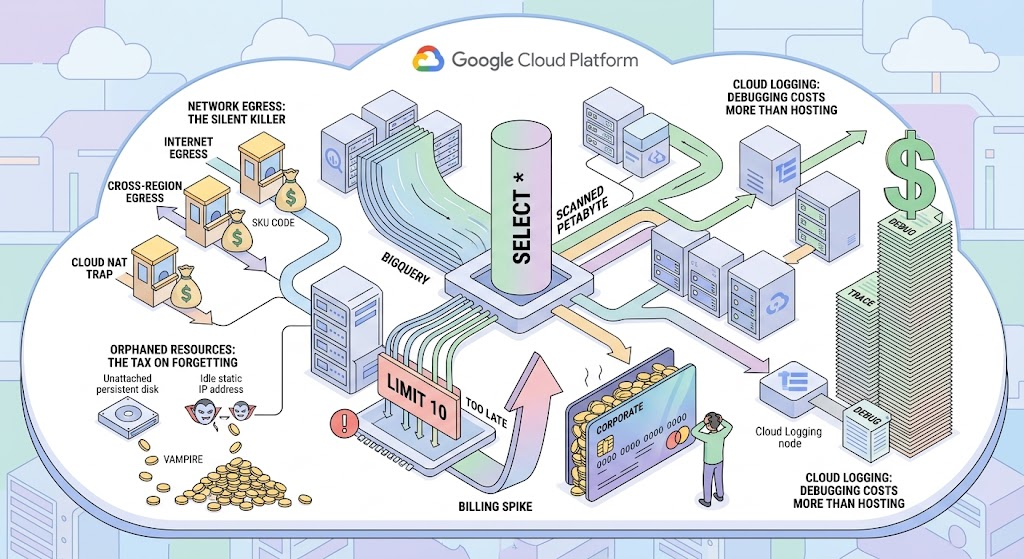
You have just discovered the fundamental, unspoken law of the cloud: Google Cloud is essentially an infinite vending machine with no maximum limit on your corporate credit card. It does not charge you for what you use; it charges you for what you provisioned and forgot to turn off.
When an unexpected billing spike hits, or worse, when your entire project is suddenly suspended due to a depleted budget, it is not a banking error. It is an engineering failure. This article is a definitive, heavily detailed, and highly cynical deconstruction of why your GCP invoice is hemorrhaging money, where the hidden costs are buried, and how to architect strict financial boundaries using Lifecycle Policies, Budgets, and automated infrastructure audits—without writing a single line of code for you, because financial responsibility cannot be copy-pasted.
Part 1: The Symptoms of Financial Hemorrhage
Billing problems in the cloud do not manifest as technical errors in your application logs. They manifest as emails from your Chief Financial Officer. Depending on your architecture and your mistakes, the financial bleeding usually falls into one of three distinct categories.
Symptom 1: The Astronomical Spike (The Heart Attack) Your daily cloud cost usually hovers around fifty dollars. Yesterday, it spiked to four thousand dollars in a single twenty-four-hour period. This is the signature of a catastrophic, active configuration error. This is not a forgotten server; this is a highly active process that has gone entirely rogue. It is usually caused by an infinite loop in a serverless function, a massive spike in outbound network traffic, or a junior data analyst writing a catastrophically inefficient SQL query in BigQuery that scanned a petabyte of unpartitioned data.
Symptom 2: The Silent Bleed (The Vampire Effect) Your bill is not spiking, but it is slowly, organically creeping upward every single month by ten or fifteen percent, even though your user base and traffic remain completely flat. This is the symptom of orphaned infrastructure. Every time your CI/CD pipeline deploys a new environment and fails to clean up the old one, it leaves behind detached persistent disks, reserved static IP addresses, and forgotten load balancer forwarding rules. These resources act as digital vampires, quietly draining your budget while performing absolutely zero useful work.
Symptom 3: The Hard Suspension (The Project Death) This is the ultimate nightmare. You log in to find that your entire Google Cloud project has been suspended. All virtual machines are stopped, your API requests are returning HTTP 403 Forbidden, and your database is locked. This happens when the credit card associated with your active Billing Account expires, the bank declines a massive automated charge, or you hit a hard-capped budget limit that triggered an automated billing disablement. Your production environment is completely dead, not because of a technical bug, but because the money ran out.
Part 2: The Core Culprits (Where the Money Actually Goes)
To stop the bleeding, you must understand exactly how Google Cloud calculates its invoices. Cloud providers are exceptionally good at hiding massive costs inside seemingly innocent technical features. Here are the most notorious budget destroyers in enterprise GCP environments.
Culprit 1: Network Egress (The Silent Killer) In Google Cloud, bringing data into the network (Ingress) is generally completely free. Moving data out of the network (Egress) is ruthlessly expensive. Network egress is the most misunderstood and poorly optimized cost in cloud architecture.
- Internet Egress: If your servers are sending massive amounts of data to external users (for example, serving video files or large JSON payloads) without a CDN (Content Delivery Network) like Cloud CDN or Cloudflare, you are paying premium internet transfer rates.
- Cross-Region Egress: If your database is located in
us-central1(Iowa) but your application servers are located ineurope-west3(Frankfurt), every single byte of data transferred between them crosses Google’s transcontinental fiber optic cables, and you are billed heavily for inter-region transit. - The Cloud NAT Trap: If your private virtual machines need to download updates or send telemetry data to the internet, they use Cloud NAT. You are billed not only for the egress traffic itself but also a premium per-gigabyte processing fee just for passing the traffic through the NAT gateway.
Culprit 2: The BigQuery SELECT * Disaster BigQuery is a phenomenal, serverless data warehouse. It is also a financial weapon of mass destruction if used improperly. BigQuery charges you based on the volume of data processed (scanned) during a query, not the data returned. Because BigQuery utilizes a columnar storage format, if a junior data analyst types SELECT * FROM massive_production_table LIMIT 10, they assume the database will stop after finding ten rows. This is a complete illusion. BigQuery will scan every single column of the entire petabyte-scale table, calculate the processing cost of the entire dataset, charge you thousands of dollars, and only then apply the LIMIT 10 filter to the final visual output. Without strict partition filtering, your analytics team will destroy your monthly budget before lunchtime.
Culprit 3: Orphaned Compute Resources (The Tax on Forgetting) When you delete a Virtual Machine in Compute Engine, you assume you stop paying for it. However, if your Terraform script or manual deletion process is flawed, you might only delete the compute instance, leaving behind the attached Persistent Disk (storage) and the reserved Static External IP address.
- Orphaned Disks: A 1-Terabyte SSD persistent disk will continue to cost you hundreds of dollars a month, blindly storing an operating system that no longer has a server attached to it.
- Idle Static IPs: Due to global IPv4 address exhaustion, Google Cloud actively punishes you for hoarding IP addresses. You are actually charged a higher hourly rate for a static IP address that is not attached to a running instance than for one that is actively being used.
Culprit 4: Cloud Logging (When Debugging Costs More Than Hosting) You deploy an application and set the logging level to DEBUG or TRACE to troubleshoot an issue. You forget to turn it back to INFO or ERROR. Your application generates tens of thousands of log lines per second. Cloud Logging ingests all of this text. You receive a massive bill for Logging Ingestion and Logging Retention. In many poorly optimized microservice architectures, the cost of storing the log text far exceeds the cost of the virtual machines actually running the code.
Part 3: The Professional Diagnostic Toolkit
When the CFO yells about the invoice, you cannot simply guess which service is at fault. The default Google Cloud Billing Dashboard is a high-level overview designed for managers, not engineers. To find the exact bleeding artery, you must utilize professional FinOps diagnostic strategies.
Diagnostic Step 1: Cloud Billing Export to BigQuery The visual billing console is useless for granular debugging. If you have not enabled “Cloud Billing Export to BigQuery,” you are flying completely blind. This feature must be activated on day one of your cloud journey. It takes your highly detailed, line-by-line billing data and continuously streams it into a BigQuery dataset. Once the data is in BigQuery, you can write precise SQL queries to isolate anomalies. You can group costs by specific days, specific Google Cloud services, specific regions, and most importantly, specific SKUs (Stock Keeping Units). You can immediately see if the spike was caused by Network Inter Region Egress or SSD backed PD Capacity.
Diagnostic Step 2: The Power of Resource Labels If your BigQuery export shows that Compute Engine costs spiked, you still have a massive problem: which Compute Engine instance caused it? If you have hundreds of servers, you cannot know. This is why Resource Labeling is mandatory. Every single resource you deploy (VMs, disks, buckets, functions) must have metadata labels applied to them (e.g., environment: production, team: data-science, cost-center: marketing). When you export billing data to BigQuery, these labels are exported as well. You can then run a query to prove exactly which department or which specific microservice is responsible for the financial anomaly, shifting the blame from the DevOps team directly to the responsible product owners.
Part 4: Architectural Fixes and FinOps Defenses
You have identified the source of the financial leak. Now you must architect strict boundaries to ensure the cloud provider can never catch you off guard again. These are the enterprise-grade solutions for cost control.
Defense Strategy 1: Budgets, Alerts, and Pub/Sub Triggers
Setting a budget in GCP does not automatically stop your spending; by default, it only sends an email. The golden rule of FinOps is to set granular, cascading alerts. Do not set a single alert at 100% of your budget. You must configure the billing system to alert your Slack channels or PagerDuty at 50%, 75%, 90%, and 100%. If you only get notified at 100%, the damage is already done, and the invoice is already generated. For non-production environments (like staging or development projects), you can wire your GCP Budget to a Pub/Sub topic. When the budget hits 100%, it sends a message to Pub/Sub, which triggers a Cloud Function. That Cloud Function is programmed to immediately remove the Billing Account association from the project, instantly killing all resources and stopping all costs. Warning: Never, under any circumstances, implement automated billing disablement in a production environment, or you will automate the catastrophic destruction of your own business.
Defense Strategy 2: Storage Lifecycle Policies (Data Decay)
Data is a liability. Storing terabytes of old database backups, application logs, and user uploads in standard Cloud Storage buckets is a massive waste of capital. You must implement Cloud Storage Lifecycle Policies on every single bucket. These are automated rules evaluated by Google’s backend. You define a policy that states:
- Keep files in
Standard Storage(expensive, fast access) for 30 days. - After 30 days, automatically transition the files to
Nearline Storage(cheaper, slower access). - After 90 days, transition the files to
Archive Storage(extremely cheap, designed for regulatory compliance). - After 365 days, permanently delete the files. This creates an automated mechanism of data decay. Your storage costs will mathematically plateau instead of growing infinitely month over month, requiring zero human intervention.
Defense Strategy 3: BigQuery Quotas and Partition Mandates
To stop the SELECT * disaster, you must apply administrative force. First, enforce a strict architecture rule: every single massive table in BigQuery must be Partitioned (usually by date) and Clustered. You then flip a specific configuration switch on the table that says Require partition filter. If an analyst tries to query the table without specifying a WHERE date = '2026-07-13' clause, BigQuery will outright reject the query before it even starts executing, saving you thousands of dollars. Second, utilize BigQuery Custom Quotas. You must navigate to the IAM & Admin Quotas page and set a maximum “Query usage per day” limit at the project level, and more importantly, at the user level. You can strictly cap a specific junior data analyst to scanning a maximum of 500 Gigabytes per day. Once they hit that limit, their queries will fail with a Quota Exceeded error until midnight, forcing them to learn how to write optimized SQL.
Defense Strategy 4: Network Egress Mitigation
Network egress costs require fundamental architectural redesigns to mitigate. If your microservices need to talk to each other across different GCP projects, never route the traffic through external public IPs. Always utilize VPC Network Peering or Shared VPCs to ensure the traffic remains entirely on internal Google infrastructure, drastically reducing transit costs. If you are serving static assets (images, JavaScript) to global users, you must put a Content Delivery Network (Cloud CDN) in front of your storage buckets. The CDN caches the heavy files at the edge of Google’s network (close to the user), completely bypassing the massive cross-ocean egress transit fees associated with fetching the file from your core servers every single time.
Defense Strategy 5: Automated Janitor Scripts for Orphaned Resources
Do not rely on humans to clean up infrastructure. Humans forget. You must build an automated “Janitor” system. Write a script (using Python or Go with the GCP SDK) that runs every night via Cloud Scheduler. The script scans your entire project for unattached persistent disks (disks with no users array), reserved static IPs that are not assigned to a forwarding rule or instance, and idle load balancers. The script should instantly delete these orphaned resources. In highly secure environments, you can configure the script to target only resources that are lacking a specific do-not-delete label, aggressively purging any undocumented infrastructure that developers spun up and abandoned.
Conclusion
Unexpected billing spikes in Google Cloud are the direct result of treating the cloud like a traditional on-premise data center. In an on-premise world, if you write an inefficient query or leave a server running, the only penalty is a slightly higher electricity bill. In the cloud, inefficiency is penalized directly and aggressively in dollars and cents.
Mastering Cloud FinOps is an engineering discipline, not an accounting task. By enforcing mandatory resource labeling, exporting billing data directly to BigQuery for SQL-based analysis, implementing automated storage decay lifecycles, and putting strict quotas on your data warehouses, you transform your cloud infrastructure from a financial liability into a highly predictable, strictly controlled utility. Monitor your alerts at eighty percent, enforce partition filters relentlessly, and remember: in the cloud, you do not pay for what you need; you pay for exactly what you asked for. Ask carefully.