
GCP Cloud Waste Reduction: An Engineering Blueprint for Cutting Infrastructure Costs Without Losing Performance
1. Introduction: The Anatomy of Cloud Waste
Migrating to Google Cloud Platform (GCP) is often sold to executives with a promise of infinite scalability and pay-for-what-you-use economics. In theory, this is brilliant. In practice, without a deterministic FinOps architecture, the “pay-for-what-you-use” model rapidly mutates into “pay-for-what-you-forgot-to-turn-off.”
The symptom is universal across mid-market and enterprise companies: the monthly GCP invoice arrives, and the CFO looks at it like a ransom note. The engineering team claims the resources are critical for velocity, while finance demands arbitrary 20% budget cuts. This conflict arises because standard cloud billing dashboards treat symptoms rather than root causes. They show you that Compute Engine costs spiked, but they do not reveal that the spike was caused by three abandoned staging environments.
Cloud waste is not a financial problem; it is a data engineering and architectural problem.
To solve it, we must abandon the reactive “cost-cutting month” anti-pattern—where engineers manually hunt for idle VMs—and replace it with a continuous, automated pipeline. We need an infrastructure that inherently resists dynamic chaos and enforces mathematical predictability.
2. The Waste Reduction Algorithm
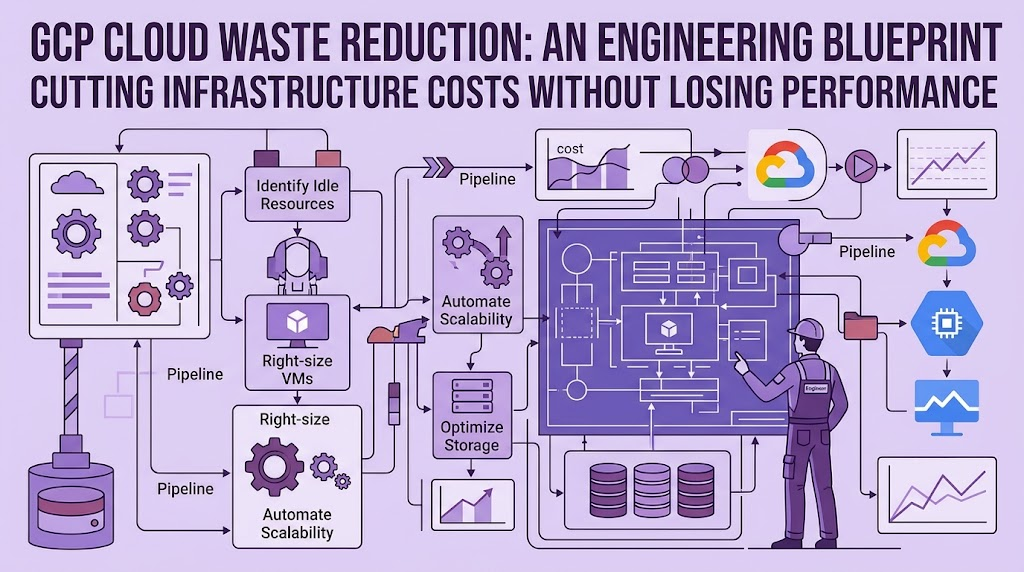
Before touching the GCP console, we must define cost optimization as a strict, four-step algorithmic pipeline.
- Discovery (Telemetry): Continuous, automated scanning of the GCP environment for idle, unattached, or over-provisioned resources using Cloud Asset Inventory and BigQuery.
- Isolation (Tagging): Programmatic quarantine workflows. Suspicious assets are not immediately deleted; they are labeled (e.g.,
status: stale,action: delete_at_end_of_month). - Policy Enforcement (Guardrails): Using Terraform and GCP Organization Policies to physically block engineers from deploying unoptimized architectures.
- Lifecycle Automation: Programmatic migration of stale data to cold storage and automated termination of orphaned instances.
Let us break down the four main vectors of cloud waste, comparing Google’s idealized recommendations with the harsh realities of production engineering.
3. Vector A: Orphaned Storage & Persistent Disks
The Anti-Pattern
An engineer needs to spin down a virtual machine. They delete the Compute Engine instance via the UI or a quick CLI command but forget a crucial detail: by default, unattached Persistent Disks (PDs) are not deleted alongside the VM unless explicitly flagged. Six months later, the company is paying thousands of dollars for terabytes of SSD storage attached to absolutely nothing.
Google’s Recommendation vs. Engineering Reality
- Google Recommends: Use the Active Assist (Recommender) API. It automatically flags idle disks and suggests deletion.
- The Reality: The Recommender API is helpful but passive. Engineers ignore dashboard alerts. Furthermore, blindly trusting an AI recommendation to delete a disk can lead to catastrophic data loss if that disk contained a crucial, albeit rarely used, database backup.
The Deterministic Solution (Trade-offs)
| Approach | Pros | Cons | Verdict |
| Manual Scripting | Easy to write (a simple bash script parsing gcloud compute disks list --filter="-users:*"). | Prone to failure, does not integrate with IaC, requires manual execution. | Reject. |
| GCP Recommender UI | Native, visually appealing, zero code required. | Passive. Requires a human to click “Apply”. | Good for audits, bad for pipelines. |
| Automated IaC Guardrails | Mathematically guaranteed cleanup. Disks are strictly coupled to VM lifecycles via Terraform. | Requires high engineering discipline and refactoring existing modules. | The Engineering Standard. |
The Tech Macro Implementation:
Instead of hunting for orphaned disks, we prevent their creation. In Terraform, every compute module must explicitly enforce the auto_delete = true parameter for boot disks, and secondary disks must have a strict label taxonomy. For existing infrastructure, we deploy a Cloud Function triggered by Cloud Scheduler that queries the Asset Inventory for disks with zero attachments for over 30 days, automatically takes a final snapshot (for safety), and then deletes the disk.
Real-World Case: A mid-sized e-commerce client accumulated $1,200/month in orphaned PDs and forgotten snapshots. By implementing an automated snapshot-and-delete pipeline, the waste was reduced to $0 in less than a week, with a fail-safe backup costing mere pennies in Cloud Storage Archive.
4. Vector B: Over-Provisioned Compute
The Anti-Pattern
Driven by the fear of production downtime, developers routinely over-provision. The logic is simple: “I am not sure if this microservice needs 2 or 8 vCPUs under load, so let’s provision 16 just to be safe.” Multiply this by 50 microservices, and you have a Kubernetes cluster running at 12% average CPU utilization while burning $10,000 a month.
Google’s Recommendation vs. Engineering Reality
- Google Recommends: Rely on the Compute Engine Rightsizing Recommender and implement Horizontal Pod Autoscaling (HPA) in GKE.
- The Reality: HPA is excellent, but if the baseline node pool uses expensive N2-standard machines for non-critical workloads, you are autoscaling inefficiency. Developers rarely downsize their instances voluntarily because they do not pay the bill.
The Deterministic Solution
Compute optimization requires a multi-layered approach:
- Environment Separation: Production requires rock-solid N2/N2D instances. Staging, testing, and batch-processing environments do not.
- Spot Instances: For stateless workloads or batch data processing, standard instances are a waste of capital. Spot VMs offer up to 90% discounts.
Solutions Trade-offs for Non-Prod Compute:
| Strategy | Advantages | Disadvantages |
| Preemptible / Spot VMs | Massive cost savings (up to 90%). Ideal for CI/CD, batch jobs, and fault-tolerant GKE node pools. | The VM can be killed by Google at any time. Unsuitable for stateful databases. |
| Committed Use Discounts (CUDs) | Up to 57% savings for predictable, baseline workloads without the risk of termination. | Locks capital for 1 to 3 years. Dangerous if architecture shifts (e.g., migrating to serverless). |
| Custom Machine Types | You pay exactly for the CPU/RAM ratio you need, eliminating standard tier waste. | Slightly higher management overhead in IaC. |
Real-World Case: We audited a company running three identical GKE clusters for Dev, Stage, and Prod. By migrating the Dev and Stage node pools strictly to Spot instances and tuning the Node Auto-provisioning, infrastructure costs dropped by 62% overnight, with zero impact on the developer experience.
5. Vector C: BigQuery Full-Scan Inefficiencies
The Anti-Pattern
BigQuery is a phenomenal analytical engine, but it is also the easiest place to accidentally incinerate money. The ultimate anti-pattern is a junior data analyst running SELECT * FROM production_events_table just to check the formatting of a single column. Because BigQuery is a columnar database, SELECT * forces a full table scan. If that table is 50TB, that single keystroke just cost the company $250.
It is the equivalent of buying an entire supermarket just to verify the expiration date on one carton of milk.
Google’s Recommendation vs. Engineering Reality
- Google Recommends: Use Autoscaling Slots (Capacity Pricing) so costs are predictable, and rely on query execution insights.
- The Reality: Capacity pricing is great for large enterprises with steady workloads, but for mid-market companies with spiky usage, On-Demand pricing (paying per TB scanned) is often cheaper—if controlled. However, relying on humans to write optimized SQL is a statistically doomed strategy.
The Deterministic Solution (Hardware Guardrails)
We do not train analysts to write better SQL; we build an architecture that physically prevents them from executing bad SQL.
- Mandatory Partitioning: Every large table in BigQuery must be partitioned (usually by
_PARTITIONDATE). - The Golden Guardrail: In Terraform, we enforce the flag
require_partition_filter = trueon table creation. If an analyst attempts to query the table without aWHERE date >= ...clause, BigQuery API rejects the query before it scans a single byte. Cost = $0. - Custom Quotas: We implement daily scan limits (e.g., 2 TB per user per day). If a script goes rogue, it hits the ceiling and stops, preventing a $10,000 surprise bill.
Real-World Case: A marketing analytics pipeline was querying a raw attribution table daily, costing roughly $450 per run. By introducing a clustered and partitioned materialized view via Dataform, the daily query began scanning only the delta (new data). The cost plummeted from $450 to $1.20 per day.
6. Vector D: Cloud Storage Data Bloat
The Anti-Pattern
Applications generate terabytes of logs, backups, and user uploads. By default, engineers dump everything into standard, multi-region Cloud Storage buckets. Fast forward two years, and the company is paying premium rates to store debugging logs from 2024 that absolutely no one will ever read again, but compliance requires keeping them for 5 years.
Google’s Recommendation vs. Engineering Reality
- Google Recommends: Enable “Autoclass.” Google will automatically move data between Standard, Nearline, Coldline, and Archive tiers based on access patterns.
- The Reality: Autoclass is a black box. It includes management fees per object. If you have a bucket with 50 million tiny JSON log files, the Autoclass management fee will completely erase any savings from cheaper storage tiers.
The Deterministic Solution
Instead of paying Google to guess our access patterns, we define strict Object Lifecycle Management rules in our infrastructure code. We know exactly when data becomes stale.
Storage Lifecycle Algorithm:
- Day 0 to 30: Data lives in
Standardstorage for immediate querying and BI processing. - Day 31 to 90: Terraform rule automatically downgrades objects to
Nearline(cheaper storage, slight cost for retrieval). - Day 91 to 365: Objects migrate to
Coldline(for disaster recovery only). - Day 365+: Objects move to
Archivestorage (pennies per terabyte) or are permanently deleted depending on legal compliance.
This pipeline is 100% predictable, requires zero ongoing human intervention, and avoids unpredictable SaaS management fees.
7. Step-by-Step Implementation: Building the Cleanup Pipeline
To deploy this architecture, you must sequence the implementation carefully to avoid breaking production.
Phase 1: Visibility (Read-Only Audit)
Do not delete anything yet. First, configure GCP Cloud Asset Inventory to export all resource metadata into a dedicated BigQuery dataset. Build a simple dbt or Dataform model to join this metadata with your billing export. This gives you a mathematical map of your waste. You will instantly see exactly which project, team, and resource ID is bleeding capital.
Phase 2: The Staging Purge
Start with non-production environments. Implement the Terraform guardrails (e.g., require_partition_filter, forced metadata labels). Introduce a script that shuts down Dev VMs at 7:00 PM on Friday and restarts them at 8:00 AM on Monday. This alone cuts non-prod compute costs by over 30%.
Phase 3: Production Guardrails
Roll out Organization Policies across the entire GCP footprint. Block the creation of external IP addresses where they are not needed. Enforce mandatory cost-center labels. Turn FinOps from a financial suggestion into a compilation requirement for your IaC.
8. Conclusions & Actionable Recommendations
Cloud cost optimization is not a one-time project; it is a permanent architectural state. If you rely on engineers to manually clean up their environments, you will fail. The only way to win the cloud efficiency game is to prioritize strict, mathematically deterministic, and resource-efficient pipelines over dynamic chaos.
Key Takeaways for CTOs:
- Stop Relying on Trust: Humans will forget to delete disks. They will write bad SQL. Build infrastructure guardrails (Organization Policies, Quotas, mandatory partitioning) that physically prevent expensive mistakes.
- Separate Compute Tiers: Never run stateless staging workloads on premium on-demand infrastructure. Force non-production environments onto Spot VMs.
- Automate Data Gravity: Implement explicit Object Lifecycle Management for Cloud Storage. Do not pay Standard tier prices for data you have not queried in three months.
- Treat FinOps as Code: If your cost allocation and waste reduction strategies are not written in Terraform and SQL, they do not truly exist.
By treating the cloud bill not as an accounting nuisance, but as an engineering metric, you transform infrastructure from a growing liability into a highly tuned, cost-efficient engine for business growth.