
Guide to Google Cloud Pub/Sub
So, you need to move data from Point A to Point B without your entire architecture collapsing like a house of cards. Someone in a meeting suggested GCP Pub/Sub because “it scales infinitely.” You looked at the documentation, saw terms like at-least-once delivery, dead-letter queues, and ack deadlines, and immediately questioned your career choices.
Do not panic. Welcome to your ultimate, zero-fluff, highly practical guide to Pub/Sub. We are not going to copy-paste the official documentation here. Instead, we are going to look at actual architectural scenarios, dig into the hidden mechanisms that can bankrupt your project, explore weird edge cases, and learn exactly when to use it—and when to run away screaming.
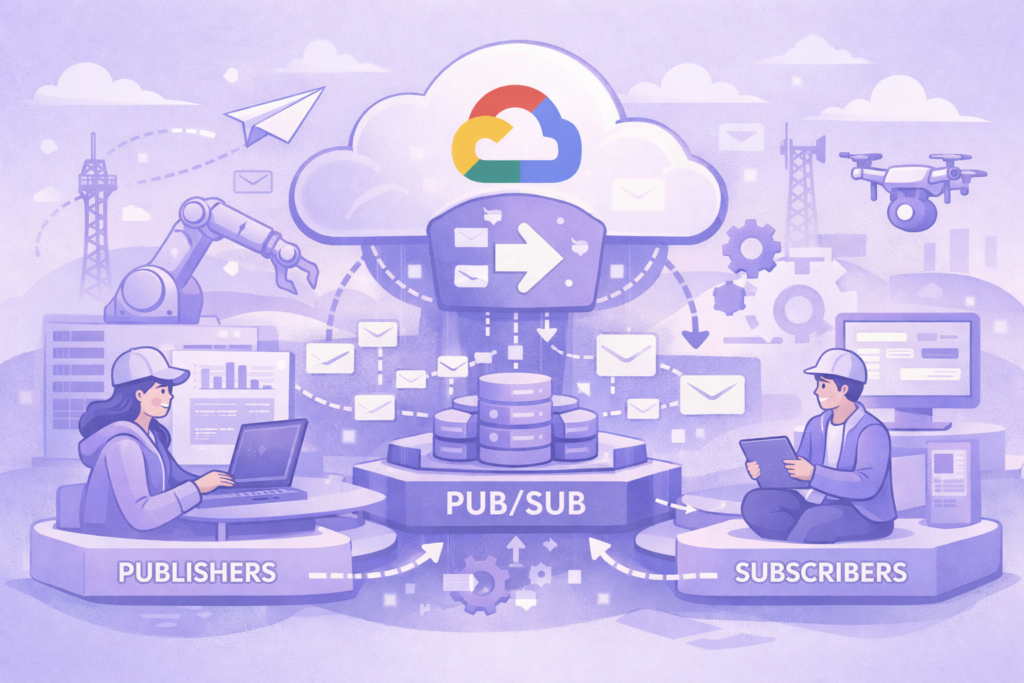
1. The Anatomy of Pub/Sub: What It Actually Is
Before we look at the cases, let us strip away the marketing jargon. Pub/Sub is an asynchronous, global messaging middleware. Think of it as a highly reliable, incredibly fast postal service for your cloud architecture.
- The Publisher drops a letter (a message) into a mailbox (The Topic).
- The Topic receives it, duplicates it if necessary, and forwards it to the delivery routes (The Subscriptions).
- The Subscriber picks up the letter from their porch, reads it, and sends a delivery confirmation (ACK) back to the post office.
If the subscriber does not send that confirmation within a specific window (the Ack Deadline), Pub/Sub assumes the subscriber fainted, panicked, or crashed, and delivers the exact same message again. Keep this behavior in mind, because it is the root cause of 90% of all Pub/Sub architectural nightmares.
2. Look and Learn: 3 Advanced Architectural Scenarios
Let us move past the classic “e-commerce order confirmation” example. That is boring. Let us look at real, production-grade engineering scenarios where Pub/Sub either saves the day or creates a chaotic mess.
Scenario A: The Multi-Tenant Analytics Firehose
Imagine you run a multi-tenant web analytics platform. You have 5,000 corporate clients sending clickstream data simultaneously. Some clients are tiny local shops generating 10 requests per minute. One client is a massive global retailer generating 150,000 requests per second.
If you route all this traffic through a single topic and a single subscription to write into BigQuery, the massive retailer will completely monopolize your downstream consumer workers. The tiny shop’s reports will face a 40-minute delay because their messages are trapped in a queue behind millions of retail clicks.
The Fix: Dynamic Topic Routing vs. Single-Topic Filtering
You have two architectural paths here, and choosing the wrong one will dramatically impact your billing and engineering sanity:
| Architectural Approach | How It Works | The Hidden Trade-off / Catch |
| Topic-per-Tenant | Create a separate Pub/Sub topic for every single customer client. | Catastrophic IAM Overhead: GCP projects have hard quotas on the total number of topics and IAM policy sizes. Managing 5,000 topics is a DevOps nightmare. |
| Single Topic + Message Attributes | Route all traffic to one massive topic. Attach a metadata attribute: tenant_id = "retail_giant". Use Subscription Filter Expressions downstream. | The Cost Trap: Pub/Sub filters messages on the server side, but GCP still charges you for data operations on messages that are filtered out by a subscription. |
The Masterclass Solution: Use a Hybrid Sharding Strategy. Group your customers into performance tiers (e.g., Topic_Tier_Free, Topic_Tier_Enterprise). Route the massive global retailer to its own dedicated topic, and let the 4,999 small shops share a pooled infrastructure. This protects your downstream consumers from noisy-neighbor syndrome while keeping your GCP bill under control.
Scenario B: The Legacy ERP Brain Transplant
You are tasked with synchronizing a modern, cloud-native microservice architecture with a 25-year-old legacy database that runs on an ancient on-premise server. The legacy database can handle exactly 50 concurrent connections. If it receives a 51st connection, it completely crashes, taking down the entire corporate accounting department.
During a marketing flash sale, your cloud microservices suddenly generate 25,000 inventory update requests per second.
The Fix: Rate-Limiting via Pull Subscriptions
If you use a Push Subscription, Pub/Sub will aggressively flood your webhook endpoint with HTTP requests to deliver those 25,000 messages. Your endpoints will try to talk to the legacy database, and the database will instantly burst into flames.
Instead, you must implement a Pull Subscription combined with a strictly throttled worker pool. Your worker applications explicitly ask Pub/Sub: “Give me exactly 10 messages, and do not give me any more until I finish processing these.” Pub/Sub acts as a massive, shock-absorbing buffer, safely holding the surge of 25,000 messages in its global storage layer while your workers slowly feed them to the fragile legacy database at a safe, predictable pace.
Scenario C: The Weird Case of the “Zombie Message Loop”
An engineer deploys a cloud function designed to process images. The function triggers when a message arrives on a Pub/Sub topic. It downloads the image, optimizes it, and sends a log message to an administrative logging topic.
Unfortunately, due to a typo in the deployment script, the engineer configures the cloud function to send its completion logs back to the original trigger topic instead of the logging topic.
The Result
The function processes an image, emits a log message to its own trigger topic, which instantly triggers the function again. The function reads the log text, tries to parse it as an image, fails, logs the error back to the topic, which triggers it again. Within 45 minutes, the system enters an exponential execution loop, generating millions of serverless invocations and creating an incredibly expensive surprise on the next cloud invoice.
3. Crucial Architecture Rules: When NOT to Use Pub/Sub
Pub/Sub is a remarkably powerful tool, but engineers frequently treat it like a Swiss Army knife and use it for jobs it was never designed to handle. If your project requires any of the following characteristics, do not use Pub/Sub.
1. You Need Strict, Guaranteed Chronological Ordering (By Default)
Pub/Sub is a globally distributed system. Messages are split across multiple zones and regions. Because of this architecture, Pub/Sub does not guarantee that messages will arrive in the exact order they were sent. If Message #1 and Message #2 are published a millisecond apart, your subscriber might receive Message #2 first.
The Caveat: Yes, GCP offers Ordering Keys. If you turn on ordering keys, Pub/Sub will enforce chronology for messages sent with the same key. However, this comes with a massive architectural penalty: if a single message with a specific key fails to acknowledge, Pub/Sub completely halts the entire delivery queue for that specific key until the issue is resolved. If you need global, high-throughput, ordered log streams, look at Apache Kafka or BigQuery Managed Streams instead.
2. You Are Dealing with Massive Binary Files
Pub/Sub has a hard message size limit of 10 Megabytes. If you try to pass raw high-resolution images, video files, or massive PDF attachments through a topic, your system will reject the requests.
- The Right Pattern (Claim Check): Upload the massive file to a secure Cloud Storage bucket first. Then, publish a tiny Pub/Sub message containing only the metadata and the storage URL:
{"file_url": "gs://my-bucket/video_99.mp4"}. Let your subscriber receive the pointer and fetch the data directly from storage.
3. You Need True Idempotency Control out of the Box
Pub/Sub guarantees at-least-once delivery. It does not guarantee exactly-once delivery. If a network glitch occurs at the exact millisecond your subscriber acknowledges a message, Pub/Sub will safely assume delivery failed and send that message again. Your application code must be idempotent—meaning if it processes the exact same message three times, it should not duplicate a charge to a customer’s credit card.
4. Secret Inside Engineering & History
To truly master Pub/Sub, you need to understand how it was built. It was not invented in a vacuum for Google Cloud Platform.
The Hidden Backstory
Internally at Google, Pub/Sub is built on top of a core infrastructure technology called MQL (Message Queue Link), which was designed over fifteen years ago to route internal logging, monitoring, and ad-serving data across Google’s global datacenters. When GCP engineers decided to build a public messaging service, they took the battle-tested MQL foundation, wrapped it in a secure, multi-tenant layer, and exposed it via an API.
How It Works Under the Hood
Unlike traditional message brokers (like RabbitMQ) that rely on a central master node directing traffic, Pub/Sub splits its architecture into two completely independent control planes:
[Publisher] ---> [Routing Data Plane: Forwarders]
                        |
                        v
         [Storage Plane: Log Buffers]
                        |
                        v
[Subscriber] <--- [Delivery Data Plane: Routers]
When a publisher sends a message, it hits a Forwarder node. The Forwarder immediately replicates the data across multiple independent storage zones before it even returns a success code to the publisher.
A completely separate set of nodes, called Routers, are responsible for polling the storage plane and actively pushing or delivering those messages to subscribers. Because storage and routing are completely decoupled, Google can lose an entire zone of routing nodes without dropping or losing a single message.
5. Cost Optimization: How to Stop Burning Money
Pub/Sub pricing looks incredibly cheap at first glance: you pay roughly $40 per Terabyte of data transferred. Because the entry barrier is so low, development teams often write highly inefficient code, leading to unexpected costs at enterprise scale.
Here is a breakdown of how Pub/Sub optimization impacts performance and costs:
| Architectural Metric | Unoptimized Approach (The Money Burner) | Optimized Approach (The Lean Engineer) | Real-World Resource Impact |
| Publishing Strategy | Sending every single log event or click as an individual HTTP API call. | Using the Client Library’s internal Batching Settings (element_count_threshold, delay_threshold). | 90% Cost Reduction: Pub/Sub bills a minimum of 1KB per request. If you send a 100-byte message alone, you pay for 1KB. Batching 10 messages together saves you 9KB of billed data. |
| Ack Deadlines | Leaving the subscription Ack Deadline at the default 10 seconds for a job that takes 45 seconds to process. | Setting the Ack Deadline to 60 seconds, matched precisely to your application processing window. | Prevents Duplicate Processing Loops: Eliminates the network noise of processing the same message multiple times because the system assumed your worker crashed. |
| Subscription Types | Using Push Subscriptions with Cloud Functions for high-throughput, predictable streams. | Using Pull Subscriptions deployed on Cloud Run or GKE with auto-scaling workers. | Saves CPU Cycles: Avoids thousands of individual HTTP overhead calls, letting your application read messages in bulk efficiently. |
6. Actionable Recommendations for Production Success
To wrap up this guide, let us establish a clean, production-ready checklist for your next Pub/Sub implementation:
- Always Attach a Dead-Letter Topic (DLQ): If a message contains corrupted data, your subscriber code will fail to process it, refuse to ACK it, and Pub/Sub will stubbornly retry delivering it forever. Configure a Dead-Letter Queue with a
max_delivery_attempts = 5. If a message fails 5 times, Pub/Sub automatically pulls it out of the main queue and parks it in a separate topic for manual inspection. - Enable Message Retention Wisely: By default, Pub/Sub retains unacknowledged messages for 7 days. If your consumer service breaks over a long weekend, messages will safely stack up in the cloud queue. If you are dealing with ephemeral, high-volume telemetry data where old logs lose value after a few hours, reduce the retention period to 1 day to reduce data liability.
- Monitor the
oldest_unacked_message_ageMetric: Do not just monitor CPU usage or memory on your workers. The ultimate metric for Pub/Sub health is the age of the oldest unacknowledged message. If this number trends upward, your consumer workers are failing to keep up with the queue, and you need to scale out your application instances immediately.