
Airbyte: Comprehensive Engineering Guide and Production Implementation
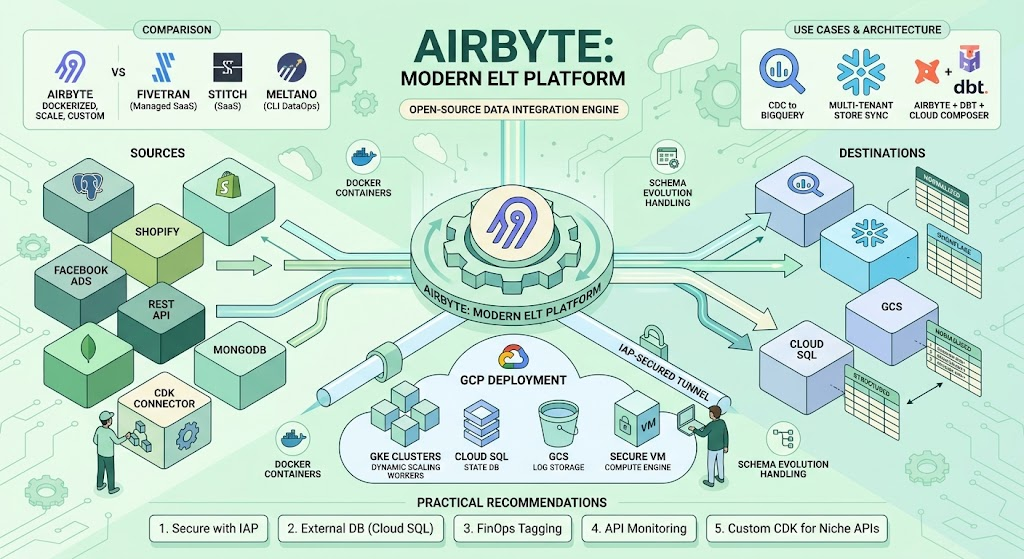
1. Introduction: The Instrument and Its History
Airbyte is an open-source data integration engine created in 2020 by Michel Tricot and John Lafleur. Historically, the data engineering industry relied on ETL (Extract, Transform, Load) processes, where transformations happened in transit. Airbyte was built for the modern ELT (Extract, Load, Transform) paradigm. It extracts data from source systems and loads it directly into a data warehouse or data lake in a normalized format, leaving the transformation layer to specialized tools like dbt (data build tool).
The core understanding of Airbyte lies in its architecture. It standardizes data movement by isolating every connector (source or destination) into its own Docker container. This means the core Airbyte engine does not need to know the specific dependencies of a PostgreSQL connector versus a Salesforce connector. They communicate through a standard Airbyte Protocol using JSON streams. This containerized approach solved the dependency hell that plagued older tools and allowed rapid community development of hundreds of connectors.
2. Competitor Comparison
To understand Airbyte’s position in the market, we must compare it honestly with its main competitors: Fivetran, Stitch, and Meltano.
Implementation Complexity:
- Airbyte: Medium to High. While the UI is user-friendly, deploying it reliably in production requires solid DevOps knowledge (Kubernetes, Docker, external databases, cloud networking).
- Fivetran: Low. It is a fully managed SaaS. You provide credentials, and it works.
- Stitch: Low. Also a managed SaaS with a simple setup.
- Meltano: High. It is an open-source, CLI-first tool based on the Singer specification. It requires strong software engineering skills and version control configuration.
Cost:
- Airbyte: Open-source version is free, but you pay for cloud infrastructure (compute, storage, egress). Airbyte Cloud charges based on credits tied to compute time and row volume. It is highly cost-effective for large database replications.
- Fivetran: High. Pricing is strictly volume-based (Monthly Active Rows). High-frequency syncs of large tables can result in massive, unpredictable bills.
- Stitch: Medium. Cheaper than Fivetran but can get expensive with high volumes.
- Meltano: Free open-source, infrastructure costs only.
Management Convenience:
- Airbyte: Good UI, but state management and version upgrades can be painful if a container fails or a connector update breaks backward compatibility.
- Fivetran: Excellent. Fully automated schema migrations and failure recovery.
- Stitch: Good, but lacks deep control over how data is nested or unnested.
- Meltano: Excellent for DataOps (configuration as code), but lacks a mature web UI for business users.
Timelines to Launch:
- Fivetran and Stitch can be launched in minutes.
- Airbyte Cloud takes minutes, but Airbyte Open Source (production-grade) takes days to design, provision (IaC), and secure.
Strengths & Weaknesses (Airbyte):
- Strengths: Connector Development Kit (CDK) allows building custom connectors in hours (Python/Java). Dockerized architecture prevents dependency conflicts. It supports both batch and CDC (Change Data Capture) methods.
- Weaknesses: High resource consumption (memory-heavy Java workers). The open-source version lacks built-in advanced user access control (RBAC) in earlier versions. Schema evolution handling is still inferior to Fivetran’s automated DDL operations.
3. Nuances of Deploying Airbyte on Google Cloud Platform (GCP)
Deploying Airbyte on a single virtual machine with default settings is a critical mistake for production. The local disk will fill up with logs, and if the VM dies, the internal state (sync history, credentials) is lost. A production setup on GCP requires separating compute, database, and storage.
Step-by-Step Production Deployment on GCP:
Step 1: Infrastructure as Code (Terraform)
Do not click through the console. Use Terraform to define a Virtual Private Cloud (VPC) with a private subnet. Airbyte should not have a public IP address to prevent security breaches.
Step 2: External Database (Cloud SQL)
Airbyte uses a PostgreSQL database to store its configuration, job history, and workspace data.
- Provision a Cloud SQL for PostgreSQL instance (e.g.,
db-custom-2-7680). - Place it in the same private VPC.
- Create three databases:
airbyte,temporal, andtemporal_visibility. - Pass the Cloud SQL private IP and credentials into Airbyte’s
.envfile via variables likeDATABASE_USER,DATABASE_PASSWORD, andDATABASE_HOST.
Step 3: External Logging (Cloud Storage)
By default, Airbyte writes logs to the local Docker volume. In GCP, configure it to write to a GCS bucket.
- Create a GCS bucket (e.g.,
gs://company-airbyte-logs). - Create a dedicated Service Account with
Storage Object Adminroles. - In the
.envfile, setGCS_LOG_BUCKET,GCS_LOG_BUCKET_REGION, and provide the Service Account key.
Step 4: Compute Layer (Compute Engine / GKE)
For medium loads, a dedicated Google Compute Engine (GCE) instance is sufficient.
- Machine type: Minimum
e2-standard-4(4 vCPUs, 16 GB RAM). Airbyte workers are memory-intensive. - Install Docker and
docker-compose. - Deploy the Airbyte instance using the modified
.envfile that points to Cloud SQL and GCS. - For enterprise high-load environments, deploy Airbyte on Google Kubernetes Engine (GKE) using the official Helm charts. This allows dynamic scaling of worker pods based on the queue size.
Step 5: Secure Access (Identity-Aware Proxy – IAP)
Since the VM has no public IP, you cannot access the web UI directly. Configure GCP Identity-Aware Proxy (IAP) to create a secure, authenticated tunnel to the VM’s port 8000. This ensures only authenticated Google Workspace users in your organization can access the Airbyte dashboard.
4. Standard Errors, Problems, and Solutions
When running Airbyte at scale, specific engineering bottlenecks will appear.
Problem 1: OOMKilled (Out of Memory) Worker Containers
When syncing massive tables (e.g., 50 million rows), the Java worker container consumes all available RAM and is killed by the OS.
- Factual: The immediate solution is to edit the
.envfile and increase theJOB_MAIN_CONTAINER_MEMORY_REQUESTandJOB_MAIN_CONTAINER_MEMORY_LIMITparameters (e.g., raise limits from 1GB to 4GB or 8GB). Additionally, ensure the host machine has enough physical RAM. - Synthesis: Relying purely on vertical scaling is a flawed architectural strategy. A better approach is to design pipelines that utilize strict incremental syncs with small logical cursors (e.g., syncing hourly instead of daily). Furthermore, Airbyte’s core engine should ideally stream data directly to a temporary GCS bucket (staging) rather than passing the entire data payload through the worker node’s memory space.
Problem 2: Source API Rate Limiting
When extracting data from SaaS applications (like Shopify or Zendesk), Airbyte makes aggressive API calls, resulting in HTTP 429 (Too Many Requests) errors, which crash the sync.
- Factual: You must configure the specific connector settings to respect API limits, if available. If the connector lacks this, you must schedule the Airbyte jobs to run less frequently or reduce the chunk size in the connector configuration. Using Airbyte’s built-in exponential backoff retry mechanism handles temporary limits.
- Synthesis: The ELT paradigm often clashes with strict API limits designed for transactional, not analytical, loads. A robust architecture might require a middleware layer: using Cloud Functions to capture webhooks from the SaaS application into a Pub/Sub queue, and then using Airbyte to read from the queue or a staging database. This decouples the extraction rate from the source system’s API limits.
Problem 3: Database Locks and Schema Evolution Failures
When loading data into a destination warehouse, a source table adds a new column, or changes a data type (e.g., from INT to VARCHAR). The sync fails because the destination schema no longer matches the incoming data stream.
- Factual: In the Airbyte UI, go to the connection settings and configure “Schema Update” behavior. You can set it to automatically propagate column additions. If a destructive change occurs (like a type change), the factual fix is to trigger a “Reset your data” full refresh, which drops the destination table and rebuilds it from scratch with the new schema.
- Synthesis: Forcing a full historical resync due to a minor data type change is financially inefficient (FinOps violation) and time-consuming. Modern data pipelines should implement a “Schema Registry” or use a raw JSON loading strategy (loading everything as a single JSONB column) and handle the schema enforcement downstream using dbt. This prevents ingestion pipelines from breaking due to upstream application changes.
5. Engineering Use Cases
Below is a spectrum of use cases, ranging from standard operational tasks to complex, non-standard architectural implementations.
Case 1: Standard Operational Reporting (PostgreSQL CDC to BigQuery)
- Description: A business needs real-time dashboards of their core application database without querying the production database directly.
- Implementation: Configure logical replication on the source PostgreSQL database. Connect Airbyte using the Postgres connector with CDC (Change Data Capture) enabled via the
pgoutputplugin. Set the destination to BigQuery. - Potential Problems: CDC requires keeping Write-Ahead Logs (WAL) on the source database until Airbyte reads them. If Airbyte goes down for a day, the source database disk might fill up with unread WAL files, causing a production outage.
Case 2: SaaS Marketing Aggregation (Facebook/Google Ads to Cloud Storage)
- Description: Consolidating marketing spend data from multiple advertising platforms to calculate Customer Acquisition Cost (CAC).
- Implementation: Use Airbyte connectors for Google Ads and Facebook Ads. Instead of a data warehouse, the destination is Google Cloud Storage (GCS) in Parquet format.
- Potential Problems: Marketing APIs frequently change their versioning and available fields. Connectors may suddenly break due to deprecation. Managing attribution windows requires historical data updates, meaning incremental syncs must support lookback windows.
Case 3: Multi-Tenant Data Consolidation (Multiple Shopify stores to BigQuery)
- Description: A company owns 15 different regional Shopify stores and needs a unified sales model.
- Implementation: Create 15 separate Source connectors in Airbyte (one for each store API key). Point them all to the same BigQuery Destination, but configure a custom table prefix for each (e.g.,
us_orders,eu_orders). - Potential Problems: Managing 15 identical pipelines manually in the UI is prone to human error. This case requires Airbyte’s Terraform Provider or Octavia CLI to deploy the connections programmatically (Infrastructure as Code) to ensure configuration parity.
Case 4: Non-Standard Internal API Extraction (Airbyte CDK)
- Description: A company has a legacy internal system with a proprietary REST API. No existing tool supports it.
- Implementation: Use the Airbyte Python Connector Development Kit (CDK). An engineer writes a Python script defining the authentication method, pagination logic, and data streams. The CDK packages this into a Docker image, which is then loaded into the Airbyte UI as a custom source.
- Potential Problems: If the internal API lacks strict sorting (e.g., no
updated_attimestamp), it is impossible to implement an incremental sync cursor. The engineer will be forced to perform a Full Refresh every time, which is unscalable for large datasets.
Case 5: High-Volume NoSQL to Relational Staging (MongoDB to Cloud SQL)
- Description: Extracting document-based data from MongoDB and flattening it for a relational analytical system.
- Implementation: Connect Airbyte to a MongoDB replica set. Airbyte will read the BSON documents and normalize them.
- Potential Problems: MongoDB documents often have deeply nested arrays and varying schemas per document. Airbyte’s basic normalization might fail or create hundreds of small nested tables. It is often better to disable Airbyte normalization, load the raw JSON into the destination, and use dbt to parse the JSON arrays.
Case 6: Advanced FinOps Orchestration (Airbyte + dbt + Cloud Composer)
- Description: An enterprise needs to tightly control cloud costs. They only want Airbyte to run data extraction just before a dbt transformation job runs, and everything must be scheduled based on upstream data readiness, not just a simple cron schedule.
- Implementation: Disable Airbyte’s internal scheduler. Deploy Google Cloud Composer (Apache Airflow). Write an Airflow DAG that uses the
AirbyteTriggerSyncOperatorto trigger the Airbyte sync via API. Once Airflow detects the sync is complete, it triggers aBashOperatororDbtCloudOperatorto execute the dbt models. - Potential Problems: Network security. Cloud Composer and Airbyte must be in the same VPC or connected via VPC Peering. Additionally, handling Airbyte job failures requires custom Airflow logic to parse the Airbyte API response to understand if the failure was a transient network error or a fatal data error.
6. Lesser-Known Features of Airbyte
While the UI covers the basics, Airbyte has features designed for senior data engineers:
- Octavia CLI / Terraform Provider: Managing configurations via UI is an anti-pattern for large teams. Airbyte offers the Octavia CLI and an official Terraform provider, allowing you to define workspaces, sources, destinations, and connections in YAML or HCL. This enables CI/CD pipelines for data integration.
- GCS/S3 Staging for BigQuery/Snowflake: By default, Airbyte inserts data using standard SQL
INSERTstatements, which is incredibly slow and expensive for BigQuery. A lesser-known but critical feature is enabling GCS Staging in the BigQuery destination settings. Airbyte will write bulk CSV/Parquet files to GCS and issue a single bulk load command to BigQuery, improving performance by up to 10x and saving BigQuery compute costs. - Custom dbt Transformations: While it is recommended to run dbt externally (e.g., via Airflow), Airbyte allows you to link a Git repository containing a dbt project directly in the connection settings. Airbyte will automatically run your custom dbt models immediately after the extraction phase finishes.
- State Export/Import: The incremental sync cursor (state) is not locked away. You can view, export, and manually overwrite the state JSON in the UI. This is invaluable when you need to force a pipeline to re-sync data from a specific date without doing a massive full refresh.
7. Conclusion
Airbyte has fundamentally changed the economics of data ingestion by commoditizing the connector ecosystem. By open-sourcing the connector code and standardizing the data transport protocol over Docker, it resolved the bottleneck of waiting for enterprise vendors to support niche APIs. However, it is not a “magic bullet.” It trades software licensing costs for cloud infrastructure costs and engineering maintenance. For small startups, managed SaaS might still be more efficient. For mid-to-large enterprises with complex, custom data sources, data privacy requirements, and capable data engineering teams, Airbyte deployed securely within a cloud environment like GCP represents the most scalable and flexible data integration architecture available today.
8. Practical Recommendations
Based on production experience, strictly adhere to these practices:
- Never Expose the UI: Never bind Airbyte to
0.0.0.0with a public IP. Always use Cloud IAP, VPN, or SSH port forwarding. - Separate the Database: Never rely on the internal Docker volume for the PostgreSQL state database. Always use a managed database service (Cloud SQL, Amazon RDS) to ensure you do not lose your sync history if the compute instance crashes.
- Disable Basic Normalization for Complex Data: If your source data contains deeply nested JSON arrays, disable Airbyte’s built-in normalization. It creates messy schemas and wastes compute resources. Load the raw JSON string into your data warehouse and use dbt for explicit, controlled unnesting.
- Implement FinOps Tagging: Ensure all cloud resources associated with Airbyte (Compute instances, GCS buckets, Cloud SQL) are tagged with standard FinOps labels (e.g.,
environment: production,service: data-integration). This allows you to measure the exact total cost of ownership of your ELT pipeline. - Monitor via API: Do not rely on logging into the UI to check for failed jobs. Use a script or Airflow to poll the Airbyte API for job statuses and send alerts to Slack or PagerDuty when a sync fails.
- Resource Allocation: Java applications are memory hungry. Do not starve the host machine of RAM, and always set Docker memory limits to prevent a single massive sync from crashing the entire host server.