
The Anatomy of GCP Leaks in 2026: How to Lose Your Data and Budget to Three Architectural Blunders
Cloud security is built on one cynical, universal rule: if the architecture allows an engineer to take a dangerous shortcut to save time, they absolutely will. In 2026, companies do not need to worry about sophisticated hackers exploiting zero-day vulnerabilities. The vast majority of breaches in Google Cloud Platform (GCP) happen simply because someone left the keys under the welcome mat, claiming “it is just faster to deploy this way.”
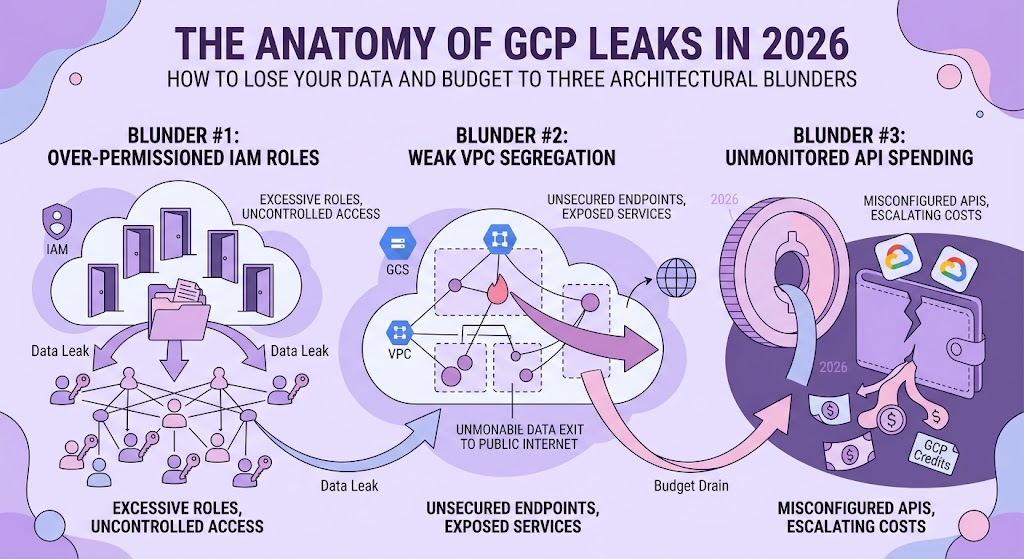
In this article, we will dissect three massive architectural holes (IAM, audit logging, and network endpoints) using real-world breach patterns. We will calculate the financial damage in dry numbers and evaluate solutions ranging from dirt-cheap quick fixes to paranoid Enterprise-grade frameworks.
Synthetic Case Study: The “Blind Spot” Incident
To grasp the scale of the disaster, let us model an incident pieced together from typical breaches in modern data-driven projects.
The Architecture (Pre-Incident):
A company rolls out an advanced cross-platform analytics framework called Attribution 2.0. The backend runs on Cloud Run, written in F# to handle heavy data processing, and calculates algorithmic conversion weights using Markov Chains. The output is synced into custom management tables in BigQuery. To monitor the volume of processed gigabytes, a daily automated script is deployed.
The Catastrophe Timeline:
- Day 1 (May 20, 10:00 AM) — The Tracking Anomaly: Web analytics flags a massive drop in data lineages. The number of unattributed transactions spikes twofold, hitting 5,000 per day. The logs are suddenly flooded with the custom
not_addstatus instead of normal session identifiers. - Day 2 (May 21, 2:00 PM) — The BigQuery Void: A data engineer queries the partitioned raw event tables in BigQuery to investigate the drop. The tables are gone. In their place is a single empty dataset containing a ransom note.
- Day 2 (May 21, 3:30 PM) — The Dead-End Investigation: The security lead attempts to pull Data-Access logs to pinpoint exactly which IP address executed the
DROP TABLEcommand. Surprise: a month prior, the DevOps lead disabled BigQuery read/write logging to “save $300 a month on Cloud Logging.” The investigation hits a brick wall. - Day 3 (May 22, 9:00 AM) — The Post-Mortem: It turns out the Cloud Run microservice was utilizing a vulnerable third-party library. The attacker gained basic container access. Because the container was running under the default Service Account—which holds project-wide
Editorprivileges—the hacker effortlessly executed a standard API call to wipe the databases.
Damage Assessment (The Financial Model)
Turning off essential logs to save a few hundred bucks almost always results in a bill with five zeros.
| Expense Category | Description | Estimated Cost (USD) |
| Analytics Downtime | Loss of traffic attribution for 3 days. Burned ad budgets due to performance marketing running completely blind. | ~$15,000 – $40,000 |
| Incident Response | Hiring external forensic auditors to manually hunt for a vulnerability without any system logs. | ~$20,000 |
| Compliance (GDPR) | Regulatory fines for PII (Personally Identifiable Information) leakage, as the company cannot prove what data the hacker downloaded before dropping the tables. | From €50,000 up to 4% of annual revenue |
| Total Damage | Direct financial losses caused by architectural laziness. | ~$85,000+ |
Vector 1: Excessive IAM Permissions and Default Service Accounts
The Core Problem:
Historically, Google Cloud tried its best to be user-friendly. If you spin up a Compute Engine, GKE, or Cloud Run instance, the system automatically assigns it the Default Compute Service Account. The punchline? Out of the box, this default account is granted the roles/editor permission for the entire project.
This means that any random script running on that machine can read any storage bucket, delete any BigQuery table, and spin up new virtual machines to mine cryptocurrency. The Principle of Least Privilege goes straight into the trash can before the deployment is even finished.
Solution Trade-offs: Comparing the Fixes
You cannot just politely ask developers to “do things securely.” The infrastructure itself must slap their hands before vulnerable code hits production.
Option 1: Organization Policy (The Hard Blocker)
The simplest and most radical method. You change the rules of the game at the GCP Organization level.
- The Fix: Enable the constraint
iam.automaticIamGrantsForDefaultServiceAccountsand set it tofalse. - Pros: 100% guarantee. Default accounts are born entirely naked, stripped of the
Editorrole. It costs nothing and takes exactly 5 minutes to enforce. - Cons (The Bottleneck): This will absolutely break automated deployments for legacy applications that are used to having god-mode access. It requires a preliminary audit. Developers will inevitably complain that “everything worked perfectly yesterday.”
Option 2: Dynamic Audit via IAM Recommender (The Soft Path)
For companies terrified of breaking legacy systems but still wanting to clean up the mess.
- The Fix: Utilize GCP’s Machine Learning engine (IAM Recommender). It analyzes 90 days of access logs and suggests: “This Service Account has the Editor role but only ever uses
bigquery.jobs.create. Downgrade it.” - Pros: Safe privilege reduction with zero downtime. It even generates ready-to-use Terraform code for the new, restricted roles.
- Cons: It is a purely reactive approach. A hacker can easily compromise the system and steal your data during the 90 days the Recommender is still “gathering metrics.”
Option 3: Workload Identity (The Enterprise Standard)
The complete elimination of static JSON keys for service accounts.
- The Fix: Bind Kubernetes Service Accounts (KSA) or external identities directly to Google Service Accounts (GSA) using OIDC.
- Pros: Authentication keys exist exclusively in RAM as short-lived tokens. Even if an attacker dumps your source code or environment variables, there are no JSON keys to steal.
- Cons: A high barrier to entry. It requires rewriting authorization pipelines in the backend code and demands a deep engineering understanding of OpenID Connect.
The Verdict for Vector 1
Unless you are running a tech giant like Netflix, do not overcomplicate it. Enforce the Organization Policy from Option 1. Endure a week of whining from developers who now have to manually write precise IAM manifests for every single microservice. It is a one-time architectural pain that will effortlessly save you tens of thousands of dollars in the future.
Vector 2: The Logging Paradox (Data-Access vs. The Budget)
The Core Problem:
In GCP, Admin Activity logs (e.g., who created a database, who deleted a Cloud Run service) are enabled by default and are completely free. However, Data-Access logs (e.g., who executed a specific SELECT query, who downloaded a file from a bucket, or who altered data) cost money.
Google charges around $0.50 per GiB for Cloud Logging ingestion. If your data pipelines process gigabytes or terabytes of data daily, logging every single transaction generates a massive volume of logs. When the financial director sees a $1,000 monthly bill just for “text files,” they panic and order the DevOps team to disable Data-Access logs.
Turning off these logs is the architectural equivalent of disabling security cameras in a bank because the electricity bill is too high. As demonstrated in our “Blind Spot” case study, when an incident occurs, you are left completely blind.
Solution Trade-offs: Comparing the Fixes
How do we maintain absolute visibility without bankrupting the infrastructure department?
Option 1: The Ostrich Strategy (Leave Logs Disabled)
- The Fix: Do absolutely nothing. Save $500 a month on logging.
- Pros: The finance department is happy right up until the moment of a breach.
- Cons: A catastrophic failure during incident response. If a malicious actor accesses PII, you have zero forensic evidence. Under GDPR regulations, if you cannot prove exactly what was stolen, authorities assume everything was stolen. The fines will instantly wipe out a decade of your logging “savings.”
Option 2: The Default Sink (Pay the Premium)
- The Fix: Enable Data-Access logs and let them route to the default
_DefaultCloud Logging bucket. - Pros: Requires zero engineering effort. It just works.
- Cons: You pay the premium $0.50/GiB ingestion fee. For a heavily loaded data warehouse, this is financially irrational.
Option 3: The Data Engineering Hack (Log Router Sink to BigQuery)
This is the Enterprise standard for cheap, searchable, and compliant auditing. We bypass the expensive Cloud Logging storage entirely.
- The Fix: You create a Log Router Sink at the project or organization level. You write an inclusion filter (e.g.,
logName:"[cloudaudit.googleapis.com/data_access](https://cloudaudit.googleapis.com/data_access)") and route this specific stream directly into a dedicated BigQuery dataset. Crucially, you configure a strict table TTL (Time-To-Live) of 30 or 90 days, depending on your compliance requirements. - Pros: You completely avoid the $0.50/GiB Cloud Logging ingestion fee. BigQuery storage is incredibly cheap (roughly $0.02 per GB per month). Furthermore, your security engineers can now use standard SQL to investigate breaches in seconds instead of writing painful JSON queries in the Logs Explorer.
- Cons: Requires a basic understanding of Terraform to configure the sinks and manage the service account permissions that write to the BigQuery dataset.
The Financial Reality of Audit Logs
| Storage Method | Cost per 1 TB of Logs | Searchability during a breach | Verdict |
Cloud Logging (_Default) | ~$500 / month | Slow, painful JSON filters | Too expensive for big data |
| Log Router to Cloud Storage (Archive) | ~$1.20 / month | Impossible without loading to an external tool | Good for 5-year compliance, bad for active investigation |
| Log Router to BigQuery (Active Storage) | ~$20 / month | Instant, standard SQL queries | The absolute winner |
The Verdict for Vector 2:
Implement the Log Router Sink to BigQuery immediately. It gives you Enterprise-grade forensic visibility at a fraction of the cost, eliminating the false dilemma between security and budget.
Vector 3: Public Endpoints and The “0.0.0.0/0” Diagnosis
The Core Problem:
Data engineers and analysts frequently need to connect to cloud databases from their local machines using tools like DBeaver or DataGrip. Because local machines usually have dynamic IP addresses, setting up a static firewall rule is annoying.
The typical human reaction? The engineer goes to the Cloud SQL network settings and whitelists the entire internet by adding the IP range 0.0.0.0/0, promising themselves they will “delete it after 15 minutes of testing.” Spoiler alert: they never delete it. The database remains exposed to every automated ransomware scanner on the web.
The exact same laziness applies to Cloud Storage buckets when someone quickly changes the ACL (Access Control List) to allUsers to share a CSV file with a colleague.
Solution Trade-offs: Comparing the Fixes
Option 1: The Legacy Bastion Host (Jump Server)
- The Fix: The database is isolated in a private VPC. To access it, engineers must SSH into a tiny intermediate virtual machine (the Bastion Host) and set up local port forwarding.
- Pros: Effectively hides the database from the public internet.
- Cons: It is an outdated, tedious workflow. Engineers hate managing SSH keys, and the Bastion Host itself becomes a single point of failure and a potential attack vector if not patched regularly.
Option 2: Hard-Coded Organization Policies (For Storage)
- The Fix: Enable the GCP constraint
constraints/storage.publicAccessPrevention. - Pros: This completely removes the ability to make any bucket public, even if the user has
Ownerprivileges. It physically blocks theallUsersIAM binding. - Cons: It solves the Storage problem beautifully, but it does absolutely nothing to protect Cloud SQL instances.
Option 3: Identity-Aware Proxy (IAP) — The Elegant Blueprint
This is how modern infrastructure handles remote access without public IP addresses or clunky VPNs.
- The Fix: Cloud SQL instances are strictly assigned Private IPs only. They live deep inside the VPC. Engineers connect via the Cloud SQL Auth Proxy combined with a TCP forwarding tunnel established by IAP.
- Pros: The connection is authenticated based on the user’s Google Identity (SSO + MFA enforced), not their physical IP address. There are no open ports, no public IP costs, and no SSH keys to rotate. The database is mathematically invisible from the outside internet.
- Cons: Requires installing the
gcloudCLI on local machines and setting up specific IAM roles (roles/iap.tunnelResourceAccessor).
The Verdict for Vector 3
Combine Option 2 and Option 3. Lock down your storage globally with publicAccessPrevention. Then, strip all public IPs from your databases and force your team to use Identity-Aware Proxy. It takes one hour to document the connection command for the team, but it permanently eliminates the risk of an exposed database.
The Bottom Line: Architecture Over Discipline
You cannot patch human laziness with Confluence pages or strict corporate memos. If a data engineer is tired, they will take the path of least resistance.
True cloud security in 2026 relies on making the secure path the only path. By systematically enforcing Organization Policies against default Service Accounts, routing audit logs cheaply to BigQuery, and hiding databases behind IAP tunnels, you are not just fixing vulnerabilities—you are physically removing the human factor from the equation. Protect the infrastructure from the engineers, and the data will protect itself.
Appendix: The Architect’s Toolkit (Terraform Implementation)
You didn’t think we would leave you with just theory, did you? Copy-pasting random YAML files from StackOverflow got the industry into this mess, but deploying strict Infrastructure as Code (IaC) will actually get us out of it.
Here are the Terraform snippets to physically enforce the security postures discussed above.
1. Kill the Default Service Account Privilege (Vector 1)
This Organization Policy prevents GCP from automatically granting the Editor role to default compute service accounts.
Terraform
resource "google_organization_policy" "block_default_service_account_grants" {
  org_id     = "YOUR_ORGANIZATION_ID"
  constraint = "constraints/iam.automaticIamGrantsForDefaultServiceAccounts"

  boolean_policy {
    enforced = true
  }
}
Note: Run a dry-run first. If you have legacy Cloud Run or GKE workloads relying on default accounts, they will crash on their next deployment.
2. The Budget-Friendly BigQuery Audit Sink (Vector 2)
This code routes all Data-Access logs across the entire project directly into a BigQuery dataset, bypassing the expensive Cloud Logging storage.
Terraform
# Create the isolated dataset for audit logs
resource "google_bigquery_dataset" "audit_logs" {
  dataset_id                  = "gcp_audit_logs_archive"
  location                    = "EU"
  default_table_expiration_ms = 7776000000 # 90 days TTL in milliseconds
}

# Create the Log Router Sink
resource "google_logging_project_sink" "bigquery_audit_sink" {
  name                   = "data-access-bq-sink"
  destination            = "bigquery.googleapis.com/projects/${var.project_id}/datasets/${google_bigquery_dataset.audit_logs.dataset_id}"
  filter                 = "logName:\"cloudaudit.googleapis.com/data_access\""
  unique_writer_identity = true
}

# Grant the Sink's service account permission to write to BigQuery
resource "google_project_iam_member" "sink_bq_writer" {
  project = var.project_id
  role    = "roles/bigquery.dataEditor"
  member  = google_logging_project_sink.bigquery_audit_sink.writer_identity
}
3. Global Lockdown for Storage Buckets (Vector 3)
This policy guarantees that no developer can accidentally (or intentionally) expose a Cloud Storage bucket to the public internet, overriding any bucket-level ACLs.
Terraform
resource "google_organization_policy" "prevent_public_access" {
  org_id     = "YOUR_ORGANIZATION_ID"
  constraint = "constraints/storage.publicAccessPrevention"

  boolean_policy {
    enforced = true
  }
}
Final Architect’s Note: Security is not about trusting your team to do the right thing. It is about building an environment where doing the wrong thing is mathematically impossible. Deploy these policies, save your budget, and sleep soundly.
We build, migrate, and optimize cloud data pipelines on Google Cloud Platform. From BigQuery query optimization to custom ingestion architectures, explore our Data Engineering on GCP services.