
From AppsFlyer to BigQuery Pipeline: ELT and FinOps Strategies
While mobile attribution platforms like AppsFlyer are industry standards for tracking user acquisition, analyzing marketing metrics in an isolated dashboard is insufficient for calculating true Return on Investment (ROI) and Customer Lifetime Value (LTV). To achieve comprehensive analytics, raw attribution data must be ingested into a centralized data warehouse like Google BigQuery and joined with internal transactional systems.
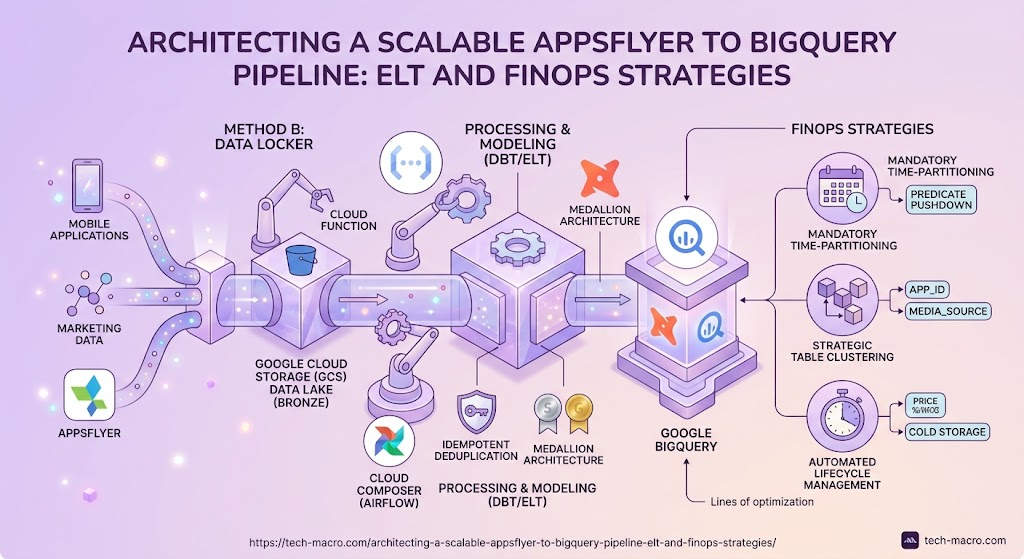
However, mobile applications generate highly granular, high-volume event streams—often millions of rows daily. A poorly designed ingestion pipeline will result in data inconsistencies and exponential Google Cloud compute costs. This guide outlines the architectural patterns, data modeling principles, and FinOps best practices required to build a fault-tolerant, cost-optimized pipeline.
Part 1: Choosing the Ingestion Architecture
There are two primary architectural patterns for routing data from AppsFlyer to BigQuery. The optimal choice depends on your organization’s data governance requirements, engineering capacity, and fault-tolerance standards.
Method A: Native BigQuery Integration (The Managed Route)
AppsFlyer provides a managed connector that streams raw event data directly into a designated BigQuery dataset.
- How it works: You grant AppsFlyer service account permissions (
roles/bigquery.dataEditor) to a specific dataset. AppsFlyer handles the batching and loading automatically. - Target Audience: Mid-tier architectures or teams without a dedicated platform engineering unit.
- Pros & Cons: It offers rapid deployment with zero infrastructure maintenance. However, it creates tight coupling. If a data schema changes or an erroneous table drop occurs, recovering historical data requires opening support tickets with the vendor, as you lack an independent raw data backup.
Method B: Data Locker & GCS Data Lake (The Enterprise ELT Route)
For enterprise environments, directly writing third-party data into the production warehouse violates decoupled architecture principles. Instead, we utilize AppsFlyer Data Locker combined with Google Cloud Storage (GCS) as an immutable raw layer.
- How it works: AppsFlyer delivers hourly Parquet or CSV files into a dedicated GCS bucket. A Google Cloud Function (triggered via Eventarc) or an orchestration tool like Cloud Composer (Airflow) detects the new payload and triggers a BigQuery load job.
- Target Audience: Enterprise data teams requiring strict data lineage and disaster recovery capabilities.
- The Advantage: GCS acts as a highly durable, low-cost “Bronze” data lake layer. If a downstream BigQuery transformation fails, or the warehouse is compromised, the original, immutable raw files remain securely archived in GCS, allowing for complete pipeline replay.
Part 2: Data Transformation and Modeling (dbt)
Raw attribution data is inherently unstructured. It frequently contains null values, nested JSON payloads, and inconsistent timestamps. Regardless of the ingestion method, this data lands in a raw_events table and requires rigorous transformation before it is exposed to BI tools like Looker Studio or Apache Superset.
We rely on dbt (data build tool) to execute these transformations entirely within BigQuery (the ELT paradigm). A professional modeling layer addresses three critical components:
- Idempotent Deduplication: Network retries often cause AppsFlyer to send duplicate event IDs. We must guarantee that our downstream financial dashboards only count each conversion once.
- Type Casting and Standardization: Converting string-based timestamps into standard
TIMESTAMPtypes and normalizing UTC offsets. - Medallion Architecture: Data flows from Raw (Bronze) to Cleansed (Silver), and finally into aggregated Data Marts (Gold) specifically structured for dashboard performance.
Practical Example: The Deduplication Model
To handle duplicates efficiently, we leverage BigQuery’s native QUALIFY clause within our dbt models. This allows us to filter window functions in a single pass without relying on complex, nested subqueries.
Here is an example of a foundational dbt model (Silver layer) that cleans the raw AppsFlyer data and ensures strict idempotency:
SQL
{{ config(
    materialized='incremental',
    unique_key='event_id',
    partition_by={
      "field": "event_date",
      "data_type": "date",
      "granularity": "day"
    },
    cluster_by=['app_id', 'campaign_name']
) }}

WITH raw_stream AS (
    SELECT
        event_id,
        app_id,
        event_name,
        media_source,
        campaign_name,
        CAST(event_time AS TIMESTAMP) AS event_timestamp,
        DATE(CAST(event_time AS TIMESTAMP)) AS event_date,
        event_revenue_usd
    FROM {{ source('appsflyer_data_locker', 'raw_events') }}

    {% if is_incremental() %}
        -- Process only new records to save compute costs
        WHERE DATE(CAST(event_time AS TIMESTAMP)) >= (SELECT MAX(event_date) FROM {{ this }})
    {% endif %}
)

SELECT *
FROM raw_stream
WHERE event_id IS NOT NULL
-- The QUALIFY clause keeps only the most recent payload for any given event_id
QUALIFY ROW_NUMBER() OVER (
    PARTITION BY event_id
    ORDER BY event_timestamp DESC
) = 1
By defining this logic in dbt, the pipeline becomes self-healing. If AppsFlyer resends historical data, or if an engineering Airflow DAG runs twice by mistake, the QUALIFY logic and the unique_key configuration ensure the final tables remain perfectly accurate.
Part 3: BigQuery FinOps and Cost Optimization
Processing millions of daily events will quickly inflate your GCP invoice if compute resources are not strictly managed. As a FinOps-focused practice, we mandate the following physical table optimizations to minimize slot consumption and bytes scanned.
1. Mandatory Time-Partitioning
This is the most critical FinOps safeguard. BigQuery analytical tables must be partitioned by an event date column (e.g., event_date).
When a table is partitioned, BigQuery physically divides the data into separate segments. If an analyst queries marketing performance for the last 48 hours, the execution engine uses predicate pushdown to only scan the partitions for those two days. Without partitioning, BigQuery performs a full table scan—reading years of historical data to answer a query about yesterday, inflating the query cost by over 90%.
2. Strategic Table Clustering
While partitioning divides data by day, clustering organizes data within that day. For attribution data, we consistently cluster BigQuery tables by app_id, media_source, and campaign_name.
When a query filters by a specific campaign (e.g., WHERE campaign_name = 'summer_promo_2026'), clustering enables BigQuery’s block pruning capabilities. The engine instantly skips storage blocks that do not contain the target campaign, drastically reducing I/O operations and latency.
3. Automated Lifecycle Management (Cold Storage Transition)
Granular, user-level click data loses its analytical value rapidly. There is no business justification for paying premium active storage rates for three-year-old session logs.
BigQuery natively handles storage degradation: if a table or partition is not modified for 90 days, the storage price automatically drops by roughly 50%. To optimize further, we implement strict dataset lifecycle rules that automatically expire and drop temporary staging tables after 72 hours, ensuring you only pay for persistent data that drives actual business logic.
Summary: Architecting an AppsFlyer to BigQuery pipeline requires more than simply connecting an API. By enforcing a decoupled GCS architecture, dbt-driven idempotent transformations, and strict FinOps rules (Partitioning and Clustering), organizations can process immense event volumes with zero data loss, minimal query latency, and highly predictable cloud infrastructure costs.