
Gemini Enterprise: Agent Architecture and Deep Platform Engineering
Introduction: The Illusion of the Chatbot and the Reality of Orchestration
When businesses evaluate generative AI, the prevailing expectation is often a highly articulate chatbot—a monolithic conversational interface. This is a critical oversimplification. A Large Language Model (LLM) in isolation is fundamentally a statistical engine designed to predict the next token. It possesses no inherent knowledge of your current BigQuery datasets, lacks the capacity to execute external APIs, and maintains no persistent state without explicit architectural intervention.
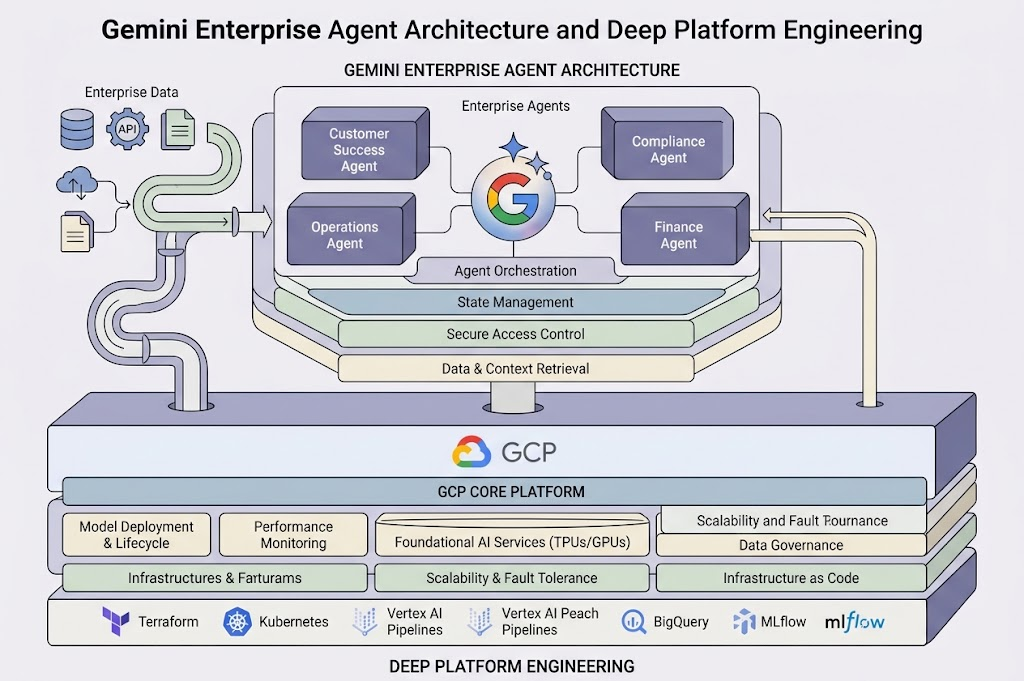
Gemini Enterprise Overview: Components and Value Proposition
Gemini Enterprise is an integrated platform for building, scaling, managing, and optimizing AI agents that can autonomously execute complex business processes. It combines access to advanced AI models (LLMs), an intuitive development interface, secure infrastructure, and the ability to deploy agents at scale in corporate environments.
Key Platform Components:
- Gemini Enterprise Agent Platform — the core for developing, orchestrating, and managing agents.
- Gemini Enterprise App — an interface for users and teams to build, run, and monitor agents.
- Agent Development Kit (ADK) — a developer framework that supports a graph-based model for agents, sub-agents, and extensions.
- Agent Studio / Agent Designer — a low-code/no-code environment for building agents easily.
- Agent Runtime — the execution environment for agents, featuring scalability and long-term memory support.
- Agent Gateway, Agent Identity, and Model Armor — critical components for security, identification, and protection against cyber attacks.
- Skill Registry, Integrations, and Connectors — an ecosystem of extensions that connect agents to existing corporate systems.
- Observability, Simulation, and Evaluation — tools for monitoring, testing, and optimizing agent performance.
The main value proposition of Gemini Enterprise is the ability to quickly build agents that do more than just answer questions. These agents perform real actions, integrate smoothly with corporate systems, follow strict security policies, and provide total transparency and control for both IT and business teams.
High-Level Agent Architecture in Gemini Enterprise
The agent architecture in Gemini Enterprise is built on the principles of modularity, scalability, and security. Each agent is not just a simple LLM, but a full-fledged software component that can:
- Use various models (including Google Gemini, partner models, or open-source options).
- Have its own identity (SPIFFE ID), access policies, and lifecycle.
- Orchestrate sub-agents and external tools to complete tasks.
- Store and use long-term memory (Memory Bank) to remember past interactions.
- Integrate with enterprise systems through custom connectors and extensions.
- Be tested, monitored, and managed through a single centralized control panel.
The graph-based agent model allows you to build complex, multi-step processes. In this setup, a main agent delegates tasks to sub-agents, which in turn communicate with other tools or services. This approach provides great flexibility and allows developers to easily reuse logic across different projects.
The Relationship Between Vertex AI Agent Builder and Gemini Enterprise Agent Platform
Vertex AI Agent Builder is a set of tools designed for the rapid development, testing, and deployment of agents based on Gemini and other LLMs. It integrates smoothly with the Gemini Enterprise Agent Platform, providing:
- Access to the latest AI models (Gemini, Claude, Mistral, Grok, etc.).
- Connections to corporate data sources (BigQuery, Cloud Storage, Workspace).
- Integration with APIs, Cloud Functions, and Cloud Run to execute real actions.
- Built-in guardrails for security and compliance.
- Low-code/no-code development capabilities through Agent Designer / Studio.
- Scaling and monitoring features via Agent Runtime and Observability.
In short, Vertex AI Agent Builder acts as the starting point for developers, while the Gemini Enterprise Agent Platform serves as the complete infrastructure for industrial deployment, management, and integration of agents into corporate workflows.
Agent Development Kit (ADK): Graph Model, Sub-agents, and Templates
The Agent Development Kit (ADK) is an open framework for developing agents that supports:
- Graph Model: Agents can be organized as a graph, where each node is a separate agent or sub-agent performing a specialized function.
- Sub-agents: These allow you to break down complex tasks into smaller sub-tasks, delegating them to other specific agents.
- Templates: Ready-made patterns for common scenarios (such as RAG, CRM integration, or DataOps).
- Multi-agent Systems: Support for orchestrating teams of agents that can interact using standardized protocols (like A2A and MCP).
- Tool Integrations: The ability to connect third-party APIs, custom code, and external services.
- Scaling: Options to run agents locally, in the cloud (Cloud Run, GKE), or on the Agent Runtime.
- Programming Languages: Support for Python, TypeScript, Go, and Java.
The ADK allows developers to build both simple and complex agent systems using modern approaches to orchestration, testing, and scaling.
Agent Studio / Agent Designer: A Low-Code Approach to Building Agents
Agent Studio (or Agent Designer) is an interactive environment for creating agents without the need for programming. Its core features include:
- Visual Canvas: Building the agent’s logic in the form of a flowchart.
- Chat Pane: Creating and configuring the agent using natural language.
- Designer Pane: Detailed low-code configuration, including workflows, schedules, and previews.
- Support for Single-Step and Multi-Step Agents: Ranging from simple tasks to complex scenarios involving sub-agents.
- Data and Tool Connections: Seamless integration with Gmail, Google Drive, Jira, and third-party APIs.
- Testing and Preview: The ability to check how an agent works before deploying it.
- Execution Scheduling: Setting up launch schedules for agents (on-demand, trigger-based, or scheduled).
This approach empowers business users and analysts to independently create agents for process automation without needing to involve software developers.
Agent Runtime, Scaling, and Long-Term Memory (Memory Bank, Memory Profiles)
Agent Runtime is a managed execution environment for agents that provides:
- Scaling: Automatic load balancing and support for thousands of concurrent agents.
- Long-Term Memory (Memory Bank): Storage for personalized data, interaction history, and facts about the user or process.
- Memory Profiles: Memory configurations for different scenarios (for example, for individual users, teams, or projects).
- Asynchronous Memory Generation: Creating and updating memory in the background.
- Consolidation and Search: Merging new information with existing data and enabling quick search for relevant memories.
- Data Isolation: Memory is strictly isolated for each identity (user or agent).
- TTL and Revisions: Automatic deletion of outdated information and keeping a history of changes.
- ADK Integration: Agents can read and write memory through APIs or built-in tools.
This allows agents to be more than just static chatbots; they become dynamic conversationalists that remember context, learn, and personalize interactions.
Agent-to-Agent Orchestration, MCP, and A2A Protocols
Agent-to-agent (A2A) orchestration is a mechanism that allows agents to interact with each other, delegate tasks, exchange data, and coordinate complex processes. The main protocols include:
- A2A (Agent2Agent Protocol): An open standard for agent interaction, regardless of the programming language or platform. It allows the creation of multi-agent systems where agents can be built in Python, Go, JavaScript, etc.
- MCP (Model Context Protocol): A protocol for unified interaction with models, tools, and agents. It ensures standardized messaging, tracing, and authentication.
- Agent Registry: A centralized registry that makes it easy to find, connect, and manage agents across a large organization.
- Agent Gateway: An entry point for access control, routing, and securing interactions between agents and external systems.
These protocols ensure flexibility, scalability, and security in multi-agent scenarios, making it possible to build complex digital ecosystems.
Agent Identification, Agent Gateway, Cryptographic IDs, and Interaction Security
Agent Identity provides unique cryptographic identification for each agent based on the SPIFFE standard. Key aspects include:
- SPIFFE ID: A unique identifier for the agent used for authentication and authorization.
- X.509 Certificates: Automatically issued for each agent to ensure secure communication.
- Agent Identity Auth Manager: A centralized credential manager that simplifies integration with external services (like OAuth and API keys).
- Agent Gateway: Controls network policies and data access, applying Context-Aware Access.
- IAM, VPC Service Controls, and PAB: Integration with Google Cloud access policies to enforce the principle of least privilege.
- Audit and Tracing: All agent actions are logged to ensure transparency and compliance.
This setup allows organizations to confidently use agents in critical business processes without risking security or compliance.
Model Armor: Protection Against Prompt Injection and Tool Poisoning
Model Armor is a specialized security layer for agents and LLMs that provides:
- Detection and Blocking of Prompt Injection: Protection against attempts to manipulate model behavior through malicious instructions.
- Protection Against Tool Poisoning: Detecting and blocking attempts to spoof or compromise external tools used by the agent.
- Content Control: Filtering unwanted, unethical, or dangerous content (such as hate speech, PII, or credentials).
- Sensitive Data Protection Integration: Preventing the leak of personal or financial data.
- Model Agnosticism: Support for all LLMs (including Gemini, OpenAI, Anthropic, and Llama) via a REST API.
- Built-in Integration with Gemini Enterprise Agent Platform: Automatic protection for all agents running on the platform.
- Customizable Policies: Organizations can fine-tune the level of protection based on context and risks.
Model Armor acts as an “AI firewall,” ensuring agents operate securely, even in open or high-risk environments.
Agent Simulation, Testing, and Behavior Validation
Agent Simulation is a tool for modeling, testing, and validating agent behavior before deploying them to production. Core features include:
- Scenario Generation: Automatic creation of test cases based on agent instructions and defined tools.
- User Simulation: Role-playing where an LLM acts as a user interacting with the agent.
- Session Tracing: Storing the complete history of interactions, inputs, responses, and tool calls.
- Quality Evaluation: Automated measurement of metrics (accuracy, safety, response quality, and error rates).
- A/B Testing: Comparing different versions of agents or models.
- Observability Integration: Simulation results are available in the monitoring dashboard for further analysis and optimization.
This approach minimizes risks and improves the quality and predictability of agent behavior in real-world scenarios.
Agent Observability, Logging, Metrics, and Monitoring Tools
Observability in the Gemini Enterprise Agent Platform is a comprehensive system for monitoring the health, performance, and security of agents. Key components include:
- Telemetry (OpenTelemetry): Agents and MCP servers automatically send telemetry data in a standardized format.
- Agent Topology: Visualization of the multi-agent system architecture, connections, and data flows.
- Metrics Dashboards: Monitoring sessions, tool call volumes, token usage, latency, and errors.
- Quality Evaluation: Online monitors to track response quality, hallucination rates, and safety.
- Model and Tool Monitoring: Separate metrics for each model, external tool, or connector.
- Logs: Detailed event logs, error logs, and execution traces.
- Traces: Step-by-step session execution tracing, including DAG diagrams, inputs, and outputs.
- Integration with Cloud Logging, Cloud Monitoring, and Looker: Enables deep analytics and alerting.
Observability is the key to reliable operation, rapid incident response, and continuous agent improvement.
Key Concepts: LLM, Agent, ReAct, Playbook, RAG, Vector Search & Embeddings, Grounding, and Tools/Extensions
LLM (Large Language Model)
Large Language Models (LLMs) are the foundation of agent intelligence. They provide natural language understanding, text and code generation, and data analysis. Gemini Enterprise offers access to Gemini models (3.5 Flash, 3.1 Pro, 2.5 Pro, Flash-Lite), as well as partner models (Claude, Mistral, Grok) and open-source options (Gemma, Llama).
Agent
An agent is a software component that has a goal, can perform actions, make decisions, and interact with other agents, tools, and users. An agent can be simple (single-step) or complex (multi-step, utilizing sub-agents).
ReAct
ReAct is a pattern that combines Reasoning and Acting. The agent analyzes the situation, makes decisions, calls tools, receives results, and adjusts its strategy. This is the foundation for building agents that do not just “talk” but actually “do.”
Playbook
A playbook is a structured scenario of agent actions for typical business processes (for example, employee onboarding, ticket processing, or financial analysis). A playbook can be implemented as a template in Agent Studio/Designer or as a set of skills in the Skill Registry.
RAG (Retrieval-Augmented Generation)
RAG is an architecture that connects an LLM with external knowledge sources. The agent first finds relevant information (via Vector Search) and then generates a response using both its internal knowledge and the retrieved data. This reduces the risk of hallucinations and increases response accuracy.
Vector Search & Embeddings
Vector Search is a search engine that uses vector representations (embeddings) to find similar objects (documents, images, events). Embeddings are numerical vectors that encode the semantics of text or other data. In Gemini Enterprise, Vector Search is used for RAG, recommendations, classification, and finding similar cases.
Grounding
Grounding is the process of linking agent responses to specific data sources. The agent does not just generate an answer; it provides links to documents, reports, and databases. This builds trust, ensures transparency, and meets Responsible AI requirements. Grounding integrates with NotebookLM for deep research and source citation.
Tools/Extensions
Tools and extensions are external APIs, functions, or services that an agent can call to perform actions (like creating a calendar event, updating a CRM record, or running a script). The Skill Registry allows for centralized management of agent skills, while connectors provide integration with corporate systems.
Practical Examples: DataOps, Corporate System Integrations, and Business Scenarios
DataOps: Building a RAG Pipeline for Analytics
Scenario: Automating corporate data analytics using RAG (Retrieval-Augmented Generation).
Architecture:
- Data from various sources (databases, documents, streams) is loaded into Cloud Storage.
- Cloud Run functions process the data, generate metadata, and divide documents into manageable chunks.
- Vector Search creates an embeddings index in a Managed Datastore.
- The agent (via the Agent Platform) receives a query, creates an embedding, performs a semantic search, and builds a prompt for the LLM.
- The response is generated based on the retrieved data, complete with exact source citations.
- All logic, monitoring, and security are handled in the background by the Agent Runtime, Observability, and Model Armor.
Benefits: Ensures data is always up-to-date, provides personalized answers, offers high scalability, and guarantees strict compliance with security policies.
Integration with Corporate Processes (ERP/CRM/ITSM)
Scenario: Automating ticket processing in ServiceNow, updating records in Salesforce, and fetching data from SAP.
Architecture:
- The agent connects to enterprise systems using ready-made connectors (ServiceNow, Salesforce, Oracle, SAP).
- The user makes a request in natural language (for example, “Create an incident in ServiceNow and update the status in Salesforce”).
- The agent understands the intent, calls the right tools, and retrieves or updates the necessary data automatically.
- Every action is fully logged, and all access, audit, and DLP (Data Loss Prevention) policies are applied.
- The system can also integrate with Google Workspace Studio to automate workflows without writing any code.
Benefits: Drastically reduces time spent on routine tasks, minimizes human errors, and increases overall process transparency.
Business Scenarios and Templates
| Industry | Example Scenarios |
| Finance | Analyzing financial reports, detecting anomalies, generating financial narratives, preparing reports, and auditing. |
| HR | Personalized employee onboarding, analyzing salary data, and automating internal employee requests. |
| Legal | Searching for legal precedents, drafting documents, analyzing contracts, and summarizing court decisions. |
| Marketing | Generating creative ideas, analyzing ad campaigns, creating content, and personalizing customer messages. |
| Support | Automating IT helpdesk tickets, training staff, and generating answers to frequently asked questions. |
| R&D | Analyzing patents, speeding up research cycles, and generating detailed research reports. |
| Sales | Segmenting customer bases, drafting email campaigns, and analyzing sales deals. |
| Software Engineering | Generating code, writing test cases, optimizing app performance, and refactoring code bases. |
Analysis: Across every industry, Gemini Enterprise agents help automate repetitive tasks, improve the quality of business decisions, speed up processes, and maintain strict compliance with corporate security policies.
When Gemini Enterprise Fits Best: Project Selection Criteria
Gemini Enterprise is highly suitable for projects where:
- Automating complex, multi-step business processes is required.
- Integration with various corporate systems (ERP, CRM, ITSM, document management) is needed.
- Personalization, long-term memory, and contextualized responses are important.
- There are strict requirements for security, auditing, and compliance (GDPR, AI Act, DLP, IAM).
- Scalability is necessary (supporting thousands of agents and global organizations).
- Multilingual support is required, including the Ukrainian language.
- Transparency, tracing, quality control, and rapid agent updates are critical.
- Flexibility in choosing AI models (Google, partner, or open-source) is needed.
- There is a need for rapid prototyping and low-code/no-code development for business users.
When to Avoid Gemini Enterprise: Limitations and Anti-patterns
Using Gemini Enterprise might not be the right choice in the following situations:
- Very simple scenarios: If you only need a basic FAQ bot without integrations, simpler solutions are more cost-effective.
- Strict offline requirements: If data cannot leave the local network and cloud infrastructure is completely prohibited.
- Highly sensitive data without encryption options: If even advanced isolation and encryption do not meet the organization’s specific strict policies.
- No need for scaling: The platform can be overkill for small teams that do not run complex processes.
- Unsupported models: When you require unconventional, highly specialized models that the platform does not currently support.
- Strict real-time latency: If you need millisecond-level responses, ultra-low latency requirements might demand specialized hardware solutions.
- Zero cloud budget: For basic experiments on local hardware, it is cheaper to use a completely open-source stack.
Model Selection, Fine-Tuning, and Partner Models
Gemini Enterprise supports a wide range of models to fit different needs:
- Google Gemini: 3.5 Flash, 3.1 Pro, 2.5 Pro, and Flash-Lite — suitable for various scenarios, ranging from fast chatbots to complex analytical agents.
- Partner models: Claude (Anthropic), Mistral, and Grok are available as managed APIs.
- Open-source models: Gemma, Llama, DeepSeek, and Qwen can be used for specific tasks or deep customization.
- Specialized formats: Embeddings, Multimodal, Veo, and Lyria are available for working with text, images, video, and audio.
Fine-tuning is possible for specific models via Vertex AI, allowing you to adapt agents to highly specific domain tasks.
Model selection primarily depends on:
- Task complexity (use Pro for complex reasoning, Flash for quick responses).
- Cost constraints (Flash-Lite is the most affordable option).
- Multimodal requirements (processing images, video, or audio).
- The need for customization (using open-source models).
- Privacy and control requirements (deploying open-source models on-premise).
Pricing, Quotas, Cost Optimization, and SLOs/SLIs
Pricing in Gemini Enterprise is based on token volume (input/output), the selected model, and any additional services used (such as Vector Search, Storage, or specific API calls).
| Model | Input (per 1M tokens) | Output (per 1M tokens) | Features |
| Gemini 3 Pro | $2.00 | $12.00 | Frontier model, preview capabilities |
| Gemini 2.5 Pro | $1.25 | $10.00 | 1M token context window, complex reasoning |
| Gemini 2.5 Flash | $0.30 | $2.50 | Excellent balance of price and performance |
| Flash-Lite | $0.10 | $0.40 | Best for high-volume, massive-scale scenarios |
- Quotas: There are standard limits on requests, tokens, images, and API calls. A free tier exists for testing, while Tier 1 and above are used for production environments.
- Cost Optimization:
- Use batch processing (can provide up to a 50% discount).
- Utilize context caching (can save up to 75% on costs).
- Select cheaper models for simple, repetitive tasks.
- Monitor usage directly through the Google Cloud Console.
- Set billing alerts and hard spending limits.
- SLO/SLI: Define Service Level Objectives (SLOs) and Service Level Indicators (SLIs) such as target latency, error rates, and cost per request. Monitor these metrics via the Observability tools to trigger automatic scaling or rollbacks if performance drops.
Monitoring, Agent Lifecycle, Updates, Rollbacks, and Spawn Management
The standard lifecycle of an agent includes:
- Development: Using Agent Studio or the Agent Development Kit (ADK).
- Testing: Running Agent Simulation and Evaluation.
- Deployment: Pushing to the Agent Runtime and Agent Registry.
- Monitoring: Utilizing Observability, Logs, and Traces.
- Updates: Managing versions, feature flags, and canary deployments.
- Rollbacks: Reverting changes via feature flags or version control.
- Spawn Management: Handling the mass creation or destruction of agents to meet scaling demands.
Best Practices for Production:
- Use feature flags for gradual, safe rollouts (canary deployments).
- Implement automatic rollbacks whenever system anomalies are detected.
- Regularly review system metrics, incident reports, and response quality.
- Maintain a centralized repository for agent templates, test cases, and operational runbooks.
- Automate testing, monitoring, and alerting pipelines.
- Thoroughly document all system changes, incidents, and architectural decisions to ensure strict compliance and smooth auditing.
Practical Step-by-Step Tutorial: Creating a Simple Agent via Vertex AI Agent Builder
Step 1: Define the Use Case
- Problem: Automating customer order tracking.
- Knowledge Sources: BigQuery, Google Cloud Storage (GCS), Google Workspace.
- Actions: Retrieve order status, update order status, escalate issues.
Step 2: Prepare the Environment
- Enable the required APIs (
aiplatform.googleapis.com,agent.googleapis.com). - Create a Google Cloud project and configure IAM permissions.
Step 3: Create the Agent
- Navigate to Vertex AI → Agent Builder.
- Create a new agent and select a model (e.g., Gemini 2.5 Flash).
- Add knowledge connectors (BigQuery, GCS).
Step 4: Add Integrations
- Add Cloud Functions to query the database.
- Connect external APIs to update order status.
Step 5: Testing
- Use the built-in simulator to test query understanding and ensure function calls execute correctly.
Step 6: Deployment
- Select a deployment method: web widget, REST API, or Google Workspace add-on.
Step 7: Monitoring and Optimization
- Track performance metrics using Cloud Logging and Cloud Monitoring.
- Set up guardrails and audit logs, then optimize the model to handle production traffic loads.
Practical Step-by-Step Tutorial: Implementing a RAG Agent with Vector Search and Managed Datastore
Step 1: Data Preparation
- Upload documents to Google Cloud Storage.
- Use Cloud Run to process document chunking and generate embeddings.
Step 2: Create a Vector Search Index
- Build an embeddings index inside Managed Datastore through the Agent Platform.
Step 3: Develop the Agent
- Use the ADK or Agent Studio to build an agent using the RAG pattern.
- Configure the processing pipeline: receive user query $\rightarrow$ generate embedding $\rightarrow$ execute semantic search $\rightarrow$ build prompt $\rightarrow$ generate final response.
Step 4: Testing
- Run simulations with various queries to verify response quality, grounding, and source citation accuracy.
Step 5: Deployment and Monitoring
- Deploy the agent to the Agent Runtime environment.
- Track operational metrics, including latency, error rates, and grounding quality.
Test Cases, Simulations, A/B Testing, and Agent Behavior Optimization
- Test Cases: Automatically generated based on agent instructions; these cover edge cases, negative user scenarios, and security checks.
- Simulations: An LLM acts as a user to model realistic, multi-step conversations and test agent behavior.
- A/B Testing: Direct comparison between different agent versions, underlying models, or prompt engineering approaches.
- Optimization: Continuous analysis of simulation results to adjust system prompts, model parameters, and tool configurations.
- Key Metrics: Accuracy, completeness, latency, error rate, hallucination rate, grounding quality, and overall user satisfaction.
Security and Privacy Threats, Legal Aspects in Ukraine (Data Storage and Personal Data)
Security Measures
- Use Model Armor, Data Loss Prevention (DLP), IAM, and VPC Service Controls.
- Apply robust data encryption methods (CMEK, EKM, HSM).
- Enforce access controls, detailed auditing, and strict data isolation.
- Protect against security threats like prompt injection, tool poisoning, and memory poisoning.
Privacy and Regulatory Compliance
- Align with GDPR, the EU AI Act, and the Law of Ukraine “On Personal Data Protection”.
- Ensure transparency requirements, uphold data subject rights, and account for limitations on fully automated decision-making.
- Consider Ukraine’s ongoing alignment with EU legal standards and upcoming legislation.
- Account for the extraterritorial reach of GDPR for businesses operating within or serving the EU market.
- Implement structured policies for personal data storage, processing, deletion, pseudonymization, access control, and proactive risk monitoring.
Localization, Ukrainian Language Support, and Multilingual Features
Gemini Enterprise offers robust multilingual support, including the Ukrainian language:
- Localized user interfaces, documentation, and system extensions.
- Ukrainian language support in Gemini Extensions, Gemini Live, and Workspace Studio.
- The ability to create custom agents that fluently understand and generate content in Ukrainian.
- Partner programs for Ukrainian universities and grants for AI development.
- Crucial for public sector, educational, and local business projects operating in Ukraine or serving Ukrainian customers.
Partner Ecosystem, Agent Gallery, and Cases (Adobe, Salesforce, ServiceNow)
The Agent Gallery is a centralized catalog featuring agents built by Google, certified partners (including Adobe, Salesforce, ServiceNow, Oracle, Workday, Accenture, Atlassian, and Deloitte), and internal enterprise teams.
Key Advantages:
- Instant access to verified, enterprise-certified agents across various industries.
- All listed agents undergo rigorous security, quality, and autonomy audits.
- IT departments maintain complete control over deployment, access permissions, and audit logs.
- Ability to combine custom internal agents with partner-built solutions within a unified ecosystem.
- Partner agents integrate directly with enterprise systems to support complex workflows (e.g., Adobe Marketing Agent, Salesforce Agentforce Sales, ServiceNow Now Assist).
Comparison Tables, Checklists, and Risk Assessment Frameworks
Comparison: Gemini Enterprise vs. NotebookLM Enterprise
| Criterion | Gemini Enterprise | NotebookLM Enterprise |
| Primary Goal | Search, content generation, and multi-agent orchestration | Centralized knowledge base and Q&A over documents |
| Input Data | All corporate data sources, SaaS platforms, and documents | Uploaded documents, files, and websites |
| Output | Contextual answers, automated actions, and multimodal content | Document synthesis, Q&A, audio summaries, and written content |
| Target Users | Business units, IT teams, data analysts, and developers | Individual users, researchers, and project teams |
| System Complexity | Orchestration of complex multi-agent systems | Dedicated focus on knowledge management |
| Integrations | ERP, CRM, ITSM, Google Workspace, and third-party APIs | Google Drive, Google Docs, and external web links |
| Automation | Autonomous agents, operational workflows, and playbooks | Q&A assistance and structured content generation |
| Multilingual | Yes, including full Ukrainian support | Yes, multi-language support |
| Security & Compliance | IAM, DLP, SSO, Audit Logs, and Model Armor | IAM, DLP, SSO, and basic Audit Logs |
Gemini Enterprise Agent Deployment Checklist
- [ ] Define the business goal and specific user scenario.
- [ ] Select the appropriate AI model and estimate cost structure.
- [ ] Prepare source data and configure essential connectors.
- [ ] Build the agent logic (using Agent Studio or the ADK).
- [ ] Run simulations, performance tests, and A/B evaluations.
- [ ] Set up IAM policies, security guardrails, and audit logging.
- [ ] Deploy the agent to production and enable Observability tracking.
- [ ] Establish SLO/SLI targets, alerting thresholds, and rollback procedures.
- [ ] Conduct user onboarding and publish operational documentation.
- [ ] Review performance metrics regularly and iterate on agent updates.
Conclusions
Gemini Enterprise goes far beyond a standard chatbot interface — it is a comprehensive platform for building, scaling, managing, and optimizing AI agents across enterprise environments. It merges advanced foundational models, a flexible architecture, developer tools, and robust security frameworks. This combination allows organizations to automate intricate business processes, connect directly to core enterprise systems, and ensure transparency throughout the entire agent lifecycle.
Choosing Gemini Enterprise is well-suited for organizations driving digital transformation, process automation, and compliance with modern data standards. For simple FAQ needs or strict offline constraints, lighter alternatives may be more practical.
With native multilingual support (including Ukrainian), model flexibility, and a broad partner ecosystem, Gemini Enterprise serves as a scalable foundation for modern digital operations. Strategic orchestration — rather than simple text chat — represents the true power of agentic AI platforms.
We build, migrate, and optimize cloud data pipelines on Google Cloud Platform. From BigQuery query optimization to custom ingestion architectures, explore our Data Engineering on GCP services.