
Data Architecture for LLM Agents: Why AI Fails Without BigQuery and Data Contracts
TL;DR
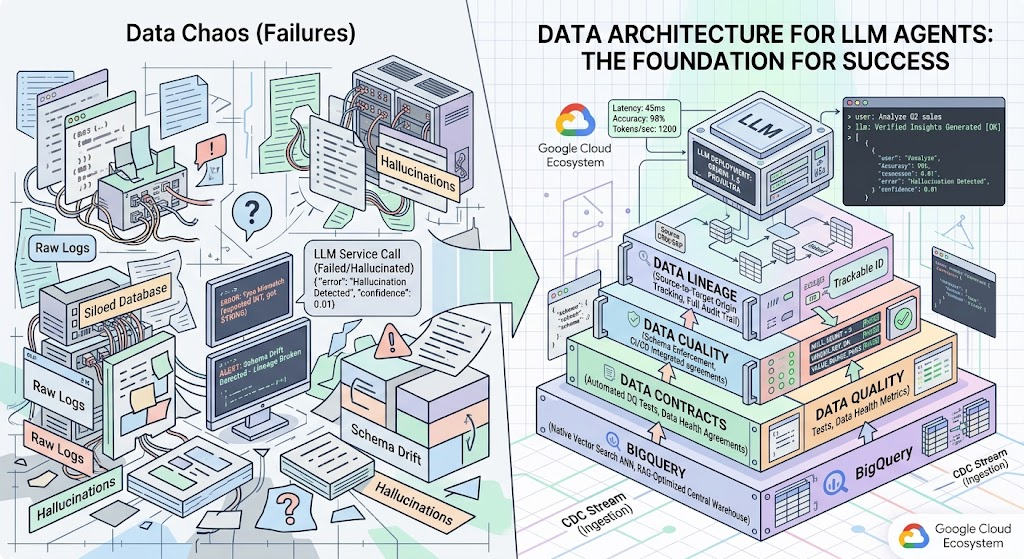
LLM agents are software programs that make decisions based on the context they receive. If this context is extracted from a chaos of unstructured, unvalidated, and unversioned data, the agent will inevitably hallucinate or execute destructive actions. Deploying autonomous AI systems is impossible without a solid data engineering foundation: a centralized warehouse (BigQuery), strict schema enforcement (Data Contracts), automated quality control (Data Quality), and data tracking (Data Lineage).
Executive Summary
The Business Problem:
Companies invest heavily in autonomous AI agents (sales assistants, data analysts, customer support) expecting to automate business processes. In practice, up to 80% of these projects never progress beyond the Proof of Concept (PoC) stage. Agents generate incorrect financial reports, offer non-existent products to customers, or base decisions on outdated metrics.
The core issue is not the limitations of the underlying models (like Gemini, GPT, or Claude), but the lack of a mature data architecture. LLM agents operate on the strict GIGO (Garbage In, Garbage Out) principle. If an agent is given direct access to a raw ERP database or an unstructured Data Lake without a semantic layer, it must interpret table relationships on its own, which guarantees errors.
The Solution:
Building an engineering foundation on Google Cloud. The architecture is centered around BigQuery as the single source of truth featuring native vector search, Dataplex for Data Quality and Lineage (Data Governance), and Dataform for data transformations. This represents a shift toward “AI-ready data,” where datasets are specifically cleaned, tested, and bound by contracts for algorithm consumption.
Architecture Evolution: From Basic Storage to AI-Ready Data
Preparing data for LLM agents follows a strict hierarchy. You cannot skip steps.
1. Foundation: Storage and Compute (BigQuery)
Raw data is useless to an agent. Agents require denormalized, clean information available with minimal latency. BigQuery acts not just as storage, but as a compute engine. Through its VECTOR_SEARCH function and Vertex AI integration, it allows the agent to perform RAG (Retrieval-Augmented Generation) directly inside the database, without exporting petabytes of context to external services.
2. Preventing Drift: Data Contracts
An agent trained to extract revenue from a revenue_usd column will break if the billing microservice renames that column to total_revenue_eur. Data Contracts are code-based agreements between data producers (Software Engineers) and data consumers (Data/AI Engineers). A contract blocks the application’s CI/CD pipeline if a schema change breaks the data structure the AI agent relies on.
3. Filtering Garbage: Data Quality
Agents lack common sense. If a transaction table receives an anomalous $1 billion entry due to a frontend bug, the agent will include it in its calculations. Data Quality systems (like Dataplex AutoDQ or Soda.io integration) run statistical checks on the data before it ever reaches the LLM prompt.
4. Transparency and Audit: Data Lineage
Under the EU AI Act requirements (effective for high-risk systems in 2026), companies must prove the origin of the data used to train or prompt a model. Data Lineage visualizes and documents the entire data graph: from the raw log in Cloud Storage to the BigQuery data mart and the final inference in Vertex AI.
Comparison of Data Systems for LLM Agents
The cloud data platform market is highly segmented. To build an AI-ready architecture, we compare the three leading platforms of 2026: Google Cloud, Snowflake, and Databricks.
| Feature | Google Cloud (BigQuery + Vertex AI + Dataplex) | Snowflake (Snowflake Horizon + Cortex) | Databricks (Unity Catalog + MosaicML) |
| Storage Architecture | Serverless Data Warehouse. Separation of storage (Colossus) and compute (Dremel). | Data Cloud. Micro-partitioning based on a proprietary format. | Data Lakehouse. Open Delta Lake format on top of cloud object storage. |
| Vector Search (Native RAG) | BigQuery Vector Search (Native, built into SQL). Auto-syncs with Vertex AI Feature Store. | Snowflake Cortex Search. Built-in vector data types, but routing is more complex. | Databricks Vector Search. Tight MLflow integration, highly flexible, requires cluster management. |
| Data Governance & Lineage | Dataplex. Automatic column-level lineage collection via Audit Logs. Native Data Catalog. | Snowflake Horizon. Strong RBAC, but lineage is mostly limited to the Snowflake ecosystem. | Unity Catalog. The standard for Lakehouse. Supports federated lineage (including external sources). |
| Compute & Transformations | Dataform (SQLX), Cloud Run (containers for custom connectors), Dataproc. | Snowpark (Python/Scala executed directly in the warehouse). | Apache Spark (Photon engine). Ideal for heavy, complex processing. |
| LLM Integration | Native: Vertex AI (Gemini 1.5 Pro/Ultra). Model inference directly via ML.GENERATE_TEXT in SQL. | Snowflake Cortex. SQL access to models like Llama 3 and Mistral. Limited choice of closed-source models. | Databricks Model Serving. Strong focus on fine-tuning open-source models (Dbrx, Llama). |
| Pricing Model | Pay per bytes scanned (On-demand) or dedicated slots (Capacity). Cheap storage, predictable RAG costs. | Pay per credits (Compute Virtual Warehouses). RAG can be expensive if warehouses run constantly. | Pay per DBU (Databricks Units). Requires precise instance tuning for FinOps optimization. |
Comparison Takeaway: For teams already in the GCP ecosystem, the BigQuery + Dataplex stack offers the most integrated experience. The serverless nature allows data engineers to focus on Data Contracts and Quality rather than tuning Spark clusters (Databricks) or managing virtual warehouse uptime (Snowflake).
Practical Use Cases
Case 1: L2 Customer Support Agent
Problem: A support LLM agent provided customers with incorrect order statuses because it read from a PostgreSQL replica that was 45 minutes behind production.
Solution: Migrated the pipeline to streaming inserts in BigQuery via Pub/Sub and Cloud Run. Implemented a Data Contract on the JSON event payload. The agent was redirected to query a Materialized View in BigQuery, where data is aggregated in real-time.
Case 2: ESG Reporting Agent (CSRD Compliance)
Problem: An agent compiling CO2 emissions data for the CSRD directive used duplicated data from ERP and IoT sensors, overstating emissions by 30%. External auditors could not trace the source of the calculations.
Solution: Configured Data Lineage in GCP Dataplex. Built transformations in Dataform where deduplication and validation (asserts) happen at the staging layer. The agent was restricted to access only the gold level data mart, which is certified for legal reporting.
Case 3: FinOps Analyst Agent in BigQuery
Problem: An agent designed to analyze cloud costs generated SQL queries against raw billing export tables, performing full scans on petabytes of logs and generating massive cloud bills just by functioning.
Solution: Created aggregated tables clustered by project_id and partitioned by usage_date. Restricted the agent’s service account using Custom Quotas to limit the maximum bytes billed per day.
Case 4: Supply Chain Agent (Shortage Prediction)
Problem: The agent ignored seasonal trends because inventory data and historical sales were in different formats without a common key (ERP SKUs did not match CRM SKUs).
Solution: Implemented a Master Data Management (MDM) layer. Built unified dictionaries using Dataform. Revoked the agent’s access to raw tables and provided a GraphQL API (hosted on Cloud Run) that returns pre-mapped, enriched data.
Anti-Patterns in LLM Agent Deployment
1. Anti-Pattern: Connecting the agent directly to a transactional database (OLTP).
Description: The agent is given direct tool-calling access to a production PostgreSQL/MySQL database to fetch context.
Impact: Complex analytical queries generated by the LLM cause table locks, leading to production downtime. The agent struggles with highly normalized schemas involving dozens of JOINs.
Correct Approach: Replicate data to an OLAP system (BigQuery) using Change Data Capture (Datastream) and provide the agent access to flat, denormalized data marts.
2. Anti-Pattern: Fixing data quality issues with prompt engineering.
Description: Instead of cleaning data in the ETL pipeline, engineers write system prompts like: “If column X is NULL, treat it as zero. Ignore transactions before 2023. Fix typos in currency names.”
Impact: Inflates the context window (increasing API costs) and increases latency. The LLM will still make mistakes on large datasets due to attention limitations.
Correct Approach: Handle all business rules in SQL transformations (Dataform/dbt) before the data is exposed to the agent.
8 Standard Problems and Solutions
1. Schema Drift Breaks RAG Pipelines
Cause: Backend developers add, remove, or rename database fields. The ETL pipeline fails, vector indexes are not updated, and the agent uses outdated embeddings.
Solution: Implement Data Contracts. Add a validation step in the CI/CD pipeline (e.g., GitHub Actions). If a schema change violates the storage contract, the Pull Request is blocked.
YAML
# Data Contract Specification Example (data_contract.yaml)
contract_version: 1.0.0
dataset: "orders_domain"
schema:
  type: record
  fields:
    - name: order_id
      type: string
      constraints: { required: true, unique: true }
    - name: amount_eur
      type: float
      constraints: { minimum: 0 } # Blocks negative transactions
2. The Agent Uses Stale Data
Cause: Batch processing runs once a day via nightly Airflow DAGs. The agent cannot see today’s transactions.
Solution: Adopt a hybrid architecture (Lambda/Kappa). Route critical data through streaming pipelines (Pub/Sub -> Dataflow -> BigQuery). Create a View for the agent that merges historical partitions with the real-time streaming table.
3. PII Leakage into Prompts
Cause: The agent extracts a transaction record containing a customer’s full name, email, or credit card number and sends it to the LLM provider’s API, violating GDPR.
Solution: Use Google Cloud DLP API in the ingestion pipeline for on-the-fly tokenization. In BigQuery, configure Policy Tags (Dynamic Data Masking) so the agent’s service account only sees masked data (e.g., xxx-xxx-1234) while maintaining analytical utility.
4. Unpredictable RAG Costs from Full Table Scans
Cause: The agent’s search tool executes text searches (LIKE '%keyword%') across terabyte-sized log tables. BigQuery charges based on data scanned.
Solution: Use table partitioning and clustering. More importantly, use BigQuery Vector Search (Approximate Nearest Neighbor), which radically reduces query compute costs compared to text scanning.
SQL
-- Vector search example in BigQuery
SELECT base.product_name, base.description
FROM VECTOR_SEARCH(
  TABLE `retail_mart.products_embeddings`,
  'product_embedding',
  (SELECT ml_generate_embedding_result FROM ML.GENERATE_EMBEDDING(
      MODEL `models.text_multilingual`,
      (SELECT 'durable hiking backpack' AS content)
  )),
  top_k => 5
);
5. Hallucinations from Conflicting Business Metrics
Cause: The agent finds a marketing_roi table and a finance_revenue table. The formulas for calculating revenue differ historically. The agent mixes them, outputting fake numbers.
Solution: Implement a Semantic Layer (using LookML or Dataform metrics). Restrict the agent from querying physical tables directly. All queries must go through the semantic API where the metric definition is hardcoded (e.g., metric: gross_revenue).
6. Inability to Audit Answers (EU AI Act Non-Compliance)
Cause: When an auditor asks, “Which tables did the agent use to deny this customer a discount?”, the engineer cannot answer because the context was assembled dynamically from multiple sources.
Solution: Enable GCP Audit Logs and Dataplex Data Lineage. Develop a middleware layer that attaches metadata (table URIs, index versions) to every request. Log both the prompt/response and the exact context_sources.
7. Infinite Loops Due to Ambiguous Metadata
Cause: An agent using the ReAct (Reasoning and Acting) framework gets stuck in a loop, repeatedly calling the same SQL query because table and column names are cryptic (e.g., tbl_ord_v2_final_bkp).
Solution: Comprehensive documentation in BigQuery. Use Data Catalog to attach a Business Glossary to all tables and columns. Instruct the agent in its system prompt to read the description field from INFORMATION_SCHEMA. Clear DDL comments equal accurate LLM behavior.
8. API Rate Limits and Concurrency Issues
Cause: During peak loads, 500 agent instances simultaneously query the Vertex AI Feature Store or BigQuery, hitting API quotas or exhausting BQ slots.
Solution: Implement Exponential Backoff in the agent’s code. Switch BigQuery to Capacity Pricing (Editions) with query queuing. Deploy Redis (Cloud Memorystore) as a caching layer between the agent and the database for highly repetitive queries (e.g., “top 10 products”).
Conclusions
Deploying LLM agents is primarily a Data Engineering challenge, not a Data Science one. An agent’s autonomy and reliability are directly proportional to the determinism of the underlying data infrastructure.
While 2026 technologies in the Google Cloud ecosystem (BigQuery Vector Search, Dataplex, native SQL-to-Gemini integration) bridge the gap between storage and inference, tools cannot replace sound architecture. If business logic is misaligned, schemas drift, and metrics are duplicated, an AI agent will simply scale that chaos at machine speed. A mature architecture requires transitioning from standard Data Pipelines to AI-Ready Pipelines, where contracts, lineage, and strict quality control act as the gatekeepers.
Practical Recommendations (Implementation Roadmap)
- Source Audit (Discovery): Before writing prompts for an agent, map your existing data. Deploy Dataplex Data Catalog to identify verified datasets and isolate shadow data (outdated copies).
- Isolate the Consumption Layer: Create a dedicated GCP project or dataset in BigQuery exclusively for agents (e.g.,
ai_agent_mart). Configure strict IAM policies. Never allow an agent’s service account to read raw or staging tables. - Enforce Data Contracts on Critical Nodes: Start with the tables that are critical for RAG context. Lock their schemas. Require backend teams to pass all schema changes on these tables through an architectural review.
- Automate Data Testing (DQ): Integrate automated tests into your Dataform or dbt pipelines. If a column like
orders.amountcontains NULL or negative values, the pipeline must halt and alert an engineer—do not load corrupted data into the agent’s view. - Centralize Embeddings: Do not generate embeddings on the fly inside the agent’s application for large datasets. Use BigQuery ML (
ML.GENERATE_EMBEDDING) to vectorize text fields in batches during the DWH loading phase. This reduces agent latency from seconds to milliseconds. - FinOps Load Testing: Before deploying an agent to production, conduct load testing to measure BigQuery slot consumption and Vertex AI token usage. Set hard Custom Quotas in the Google Cloud Console to ensure a logic error (like an infinite RAG loop) does not result in massive financial overruns.