
Server-Side GTM Cluster: A Deep Dive into Enterprise Analytics Infrastructure
1. Introduction: The Paradigm Shift in Web Analytics
For over a decade, digital analytics relied heavily on client-side tracking, where browsers sent data directly to third-party vendors. However, this era is rapidly coming to an end. The rise of ad-blockers, stringent privacy regulations (GDPR, CCPA), and aggressive browser-level tracking preventions like Apple’s Intelligent Tracking Prevention (ITP) have rendered client-side analytics highly vulnerable and increasingly inaccurate. The solution is migrating to a Server-Side Tag Management system (sGTM), transforming third-party data streams into highly controlled, first-party data assets.
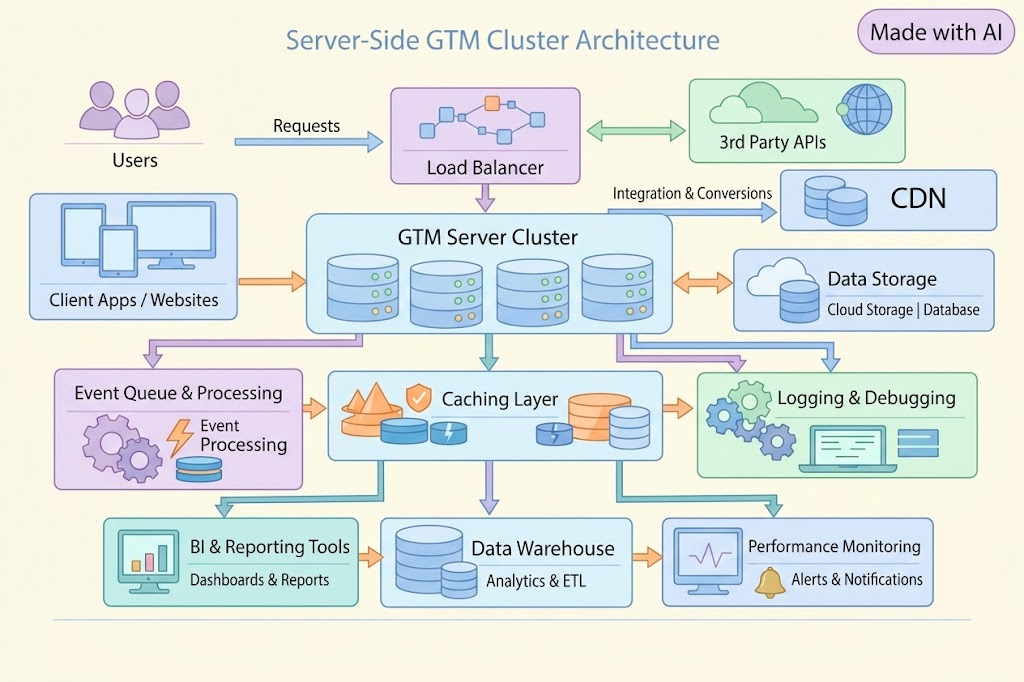
However, transitioning to sGTM at an enterprise scale is not merely a marketing task; it is a hardcore backend engineering challenge. When a platform generates millions of events daily, a poorly configured sGTM instance will inevitably collapse under its own weight, leading to silent data loss, CPU bottlenecks, and memory leaks.
This whitepaper deconstructs a real-world enterprise case study: deploying a fault-tolerant, scalable sGTM infrastructure capable of processing 10 to 12 million events per day. We will explore the mathematical capacity planning, Docker orchestration, Node.js V8 engine tuning, Nginx reverse-proxy configurations, and low-level Linux TCP stack optimizations required to handle this immense throughput. By the end of this comprehensive guide, you will understand how to build a resilient data pipeline that ensures zero data loss while routing heavy batch payloads to multiple analytical endpoints.
2. Capacity Planning and Architectural Mathematics
Before provisioning a single server, an engineer must understand the mathematical profile of the incoming load. Server-side GTM operates on Node.js, an asynchronous, event-driven runtime environment that excels at I/O operations but is notoriously susceptible to CPU contention when parsing massive JSON payloads.
The Load Profile
In our target environment, the daily traffic volume reaches between 10 and 12 million events. While this averages out to approximately 139 events per second, enterprise traffic is never uniform. Peak loads can multiply this baseline by a factor of four, resulting in sudden spikes of up to 556 incoming events per second.
Furthermore, modern analytics architectures rely on a “fan-out” pattern. A single incoming HTTP request does not simply pass through; it is duplicated, transformed, and routed to multiple destinations. In this architecture, one incoming request generates three outgoing requests: to the primary Google Analytics 4 (GA4) property, to OWOX (for BigQuery streaming), and to a Multi-Search endpoint. Consequently, during peak times, the cluster must process roughly 1668 outgoing operations per second (556 events × 3 destinations).
Node.js Limitations and Resource Sizing
Google does not publish strict hardware limits for sGTM, but empirical data from enterprise deployments reveals critical thresholds. Node.js begins to experience severe event-loop lag and garbage collection pauses when memory consumption exceeds 1.5 to 2 GB. A single Node.js instance (container) demonstrates maximum stability when processing 150 to 250 operations per second, provided it has access to 2 vCPUs.
Based on our peak load of 1668 operations per second, dividing this by the safe threshold of ~139 operations per container dictates a requirement of 12 active production containers.
Hardware Specifications:
To sustain this architecture without bottlenecking, the underlying bare-metal or cloud instance must provide:
- CPU: 24 to 32 vCPUs (allocating 2 vCPUs per container).
- RAM: 24 to 32 GB (allocating 2 GB per container).
- Storage: 100 to 200 GB SSD to accommodate extensive Nginx access and error logs, alongside Docker container logs.
- Network: A dedicated Gigabit (≥1 Gbit/s) channel capable of handling high TCP connection concurrency.
Cost vs. Value Comparison
While managed services like Google Cloud Run offer auto-scaling for sGTM out of the box, deploying a massive fan-out architecture (12M+ events) on serverless platforms often results in exponential cost scaling due to billable compute time per request. Transitioning to a well-architected bare-metal or dedicated VM setup with Docker Swarm or Kubernetes can reduce monthly infrastructure costs by up to 60-70%, while providing the granular control over the TCP stack and memory management that we will discuss in subsequent chapters.
3. Docker Orchestration and Node.js V8 Tuning
The core of the computing pool consists of 10 to 12 production containers designed to handle live traffic, alongside one strictly isolated preview container dedicated to debugging and tag validation.
Stateless Design and Load Distribution
sGTM containers must be inherently stateless. They do not share memory, and they do not cache user session data locally. Therefore, Nginx must distribute the traffic using a strict round-robin algorithm. The use of sticky sessions (session affinity) is strictly prohibited. Implementing sticky sessions in a stateless sGTM environment will inevitably cause uneven traffic distribution, leading to localized CPU spikes and the eventual crash of overburdened containers.
V8 Engine Memory Management (Defeating OOM-Kills)
The most common cause of sGTM failure under high load is the Out-Of-Memory (OOM) kill executed by the Linux kernel. When a container receives a massive batch payload (e.g., 50 events in a single JSON array), Node.js must allocate significant heap memory to parse and route the object.
To prevent uncontrolled memory growth, each container must be launched with hard resource limits: 2 vCPU and 2 GB RAM. More importantly, we must instruct the Node.js V8 engine to aggressively garbage-collect before hitting the container’s memory ceiling. This is achieved by injecting the following environment variable:
NODE_OPTIONS="--max-old-space-size=1500".
By capping the V8 old-space heap at 1500 MB, we leave a 500 MB buffer for the operating system and Docker overhead, effectively eliminating spontaneous OOM-kills. Additionally, setting --max-http-header-size=16384 (16 KB) is critical for processing the bloated HTTP headers frequently generated by GA4 clients and Content Delivery Networks (CDNs). Finally, scaling the UV_THREADPOOL_SIZE=64 optimizes Node’s asynchronous I/O capacity, allowing it to handle concurrent fan-out requests efficiently.
The Isolated Preview Environment
Engineers must test new tags without polluting the production data stream. The preview container is initialized with the RUN_AS_PREVIEW_SERVER=true flag and is bound exclusively to an internal port (8081). It remains hidden from public traffic. Nginx is configured to route traffic to this specific container only if the incoming request contains the explicit HTTP header X-Gtm-Server-Preview.
4. The Network Layer: Nginx as the Ultimate Gatekeeper
Nginx acts as the single point of entry, terminating HTTPS connections and shielding the fragile Node.js containers from anomalous traffic, slow-loris attacks, and malformed requests.
Header Propagation for Client Logic
For sGTM to function correctly—specifically for geo-attribution, device identification, and session stitching—Nginx must accurately proxy client metadata. If these headers are dropped, the analytics data loses its integrity. The required headers include:
X-Forwarded-For: To pass the client’s true IP address.X-Forwarded-Proto: To maintain the HTTPS scheme.X-Forwarded-Host: To preserve the original domain (gtm.eva.ua) necessary for the GA4 claiming client.User-AgentandAccept-Language.
Defeating the Batch Payload Bottleneck
Modern frontend analytics libraries conserve user bandwidth and battery by batching events together. A single HTTP request might contain an array of 20 to 50 events. Standard Nginx configurations are designed for lightweight web traffic and will truncate these massive JSON bodies, leading to silent data corruption and persistent 502/504 gateway errors.
To accommodate enterprise batch processing, Nginx buffers must be aggressively expanded:
client_max_body_size 20m;allows massive payloads from multi-search and OWOX integrations.proxy_buffer_size 128k;accommodates large GA4 headers.proxy_buffers 8 128k;prevents the truncation of large JSON arrays during proxying.
Warning: Never apply aggressive rate-limit zones (like limit_req) to the /collect endpoints in sGTM under high load. Analytics traffic is inherently spiky. Rate limiting will drop legitimate purchase events, destroying data accuracy.
5. Bypassing ITP and Mastering Cloudflare Constraints
The primary business objective of sGTM is establishing a first-party data context to circumvent browser tracking preventions. Apple’s Safari (via ITP) aggressively targets third-party cookies and attempts to identify CNAME cloaking.
The CNAME Trap
If you map your tracking domain (gtm.eva.ua) to your server using a CNAME record, Safari’s ITP algorithms will detect the cross-domain resolution and artificially cap the lifespan of your analytical cookies to a maximum of 7 days. To guarantee long-lasting, resilient cookies, the domain must be resolved directly using strictly A or AAAA records pointing to the server’s IP.
Cloudflare Disarmament
If you are utilizing Cloudflare as your DNS and CDN provider, you must strip away its protective layers for the sGTM subdomain. Cloudflare’s security modules are designed to protect HTML web servers, not JSON-heavy analytics endpoints. You must explicitly disable:
- Web Application Firewall (WAF): It frequently flags large batched GA4 payloads as SQL injection or XSS attempts.
- Bot Fight Mode: This will block automated server-to-server traffic (like Measurement Protocol hits from your backend).
- Header Normalization & Request Body Limits: These features will mutate or truncate the critical metadata required by the sGTM claiming clients.
Furthermore, because Cloudflare proxies the connection, Nginx will log Cloudflare’s IP instead of the user’s IP. You must use the Nginx real_ip_header X-Forwarded-For; directive alongside the set_real_ip_from lists for Cloudflare’s subnets to restore accurate geographic attribution.
6. Tuning the Linux Kernel (The TCP Stack)
When processing 12 million events daily, the application layer (Node.js) and the proxy layer (Nginx) are not the only potential bottlenecks. The operating system’s kernel itself will run out of network resources, leading to a catastrophic failure known as “socket exhaustion.”
Every time Nginx proxies a request to a Docker container, a local TCP port is opened. After the request completes, the port enters a TIME_WAIT state to ensure all delayed packets are handled. Under a load of 1668 operations per second, the default pool of ~28,000 ephemeral ports will be exhausted in less than 30 seconds, causing the server to reject all new incoming traffic.
To stabilize the Linux network stack, DevOps must modify sysctl.conf:
net.ipv4.ip_local_port_range = 1024 65535: Maximizes the pool of available local ports.net.ipv4.tcp_tw_reuse = 1: Allows the kernel to forcefully reuse sockets stuck in theTIME_WAITstate.net.ipv4.tcp_fin_timeout = 15: Accelerates the port release process from the default 60 seconds.net.core.somaxconn = 65535andnet.ipv4.tcp_max_syn_backlog = 65535: Expands the queue for incoming TCP connections to absorb sudden traffic spikes without dropping packets.- Finally, the system limits for open file descriptors (
ulimit -n) must be increased to 65535 for both the OS and the Docker daemon to prevent “too many open files” errors.
7. The Zero-Downtime Migration Strategy
Deploying this infrastructure is only half the battle. Migrating 12 million daily events without losing a single transaction requires a surgical, three-phased deployment strategy.
Phase 1: Infrastructure Audit
Before any traffic is routed, engineers must verify the foundation. This includes confirming the A/AAAA DNS records (ensuring no CNAME exists), validating the Nginx header propagation (X-Forwarded-For), verifying the Docker memory limits (--max-old-space-size=1500), and confirming the OS TCP stack parameters are actively applied.
Phase 2: Shadow Testing (The Safe Run)
Do not redirect production traffic immediately. Instead, leave the existing client-side tags intact. Inside the Web GTM container, create an isolated 4th “duplicator tag”. This tag mirrors the production payload and sends a copy directly to the new gtm.eva.ua server. The sGTM server is configured to route this shadow traffic exclusively to a designated test GA4 property.
During this phase, engineers monitor the Nginx logs strictly for 502/504 timeout errors and compare the event volumes in the test GA4 property against the live web analytics. This proves the infrastructure can handle the load without impacting business reporting.
Phase 3: The Full Cutover and Deduplication
Once shadow testing verifies stability, the legacy web tags (GA4, OWOX, Multi-Search) are removed from the frontend. The main router tag is activated, sending all data to the server cluster. Simultaneously, the server-side fan-out routing is enabled to distribute data to the actual production endpoints.
Crucial Architecture Note: To guarantee data integrity for e-commerce, the system must receive purchase events from both the frontend browser (for attribution) and the backend server via Measurement Protocol (for absolute financial accuracy). To prevent duplicate revenue reporting, a unified, cross-platform Event ID must be generated and synchronized between the frontend and backend, allowing the analytics platforms to deduplicate the dual incoming streams seamlessly.
8. Observability and Troubleshooting Playbook
Even the most robust systems encounter anomalies. Observability is the key to maintaining uptime. DevOps engineers must monitor Nginx response codes, as they are the primary indicators of cluster health. Note that tracking client-side JavaScript errors is the domain of the data analyst; DevOps focuses strictly on infrastructure.
Common Errors, Warnings, and Solutions
| Symptom / Error | Root Cause Analysis | Engineering Solution |
| HTTP 503 (Service Unavailable) | The upstream containers are overwhelmed, or health checks have failed and removed them from the Nginx pool. Often caused by OOM-kills or CPU limits being reached. | Increase the total number of containers, verify dmesg for OOM-kill logs, and ensure the OS somaxconn and ulimit limits are set to 65535. |
| HTTP 504 (Gateway Timeout) | A container is locked in the Node.js event loop trying to parse an excessively large JSON batch payload, failing to respond to Nginx in time. | Increase Nginx buffer sizes (proxy_buffer_size, proxy_buffers). Check Node.js logs for blocking operations. |
| Containers Crashing (OOM-Kill) | Node.js is consuming memory beyond the Docker limit due to large batch payloads or memory leaks. | Ensure --max-old-space-size=1500 is strictly enforced to trigger aggressive garbage collection before hitting the 2GB container limit. |
| Socket Exhaustion (Server stops responding) | TCP ports are stuck in TIME_WAIT, and no new ports can be opened for upstream connections. | Ensure tcp_tw_reuse = 1 and tcp_fin_timeout = 15 are applied in sysctl to rapidly recycle ports. |
| Cookies Expire in 7 Days | Safari’s ITP algorithm has detected a CNAME setup, treating the server as a third-party tracker. | Destroy the CNAME record. Map the domain strictly using direct A/AAAA records to the server IP. |
| Duplicated Purchase Transactions | The event_id variable is out of sync between the frontend web hit and the backend Measurement Protocol hit. | Standardize the ID generation logic across frontend and backend systems to ensure identical IDs for deduplication. |
| Cloudflare drops payload | Cloudflare WAF or Request Body Limits are treating the analytics JSON batch as an attack. | Explicitly disable WAF, Header Normalization, and Bot Fight Mode for the sGTM subdomain. |
Maintenance and Updates
When Google issues an “Update Required” notification in the GTM interface, a strict protocol must be followed. The new container bundle is downloaded, the Docker image is rebuilt, and the production containers are restarted. Crucially, before Nginx routes traffic to a restarted container, it must successfully pass an automated health-check via the /healthz endpoint to prove it is ready to accept HTTP traffic.
9. Conclusion: The Blueprint for Resilient Analytics
Deploying a Server-Side GTM infrastructure for 12 million daily events is a rigorous engineering endeavor that transcends simple marketing configurations. By understanding the limitations of the Node.js V8 engine, optimizing the Docker orchestration layer, tuning the Nginx reverse-proxy buffers, and rewriting the Linux kernel’s TCP stack, we transition from a fragile web setup to an enterprise-grade, fault-tolerant cluster.
The end result of this architectural execution is a robust system that achieves total data sovereignty. It guarantees zero data loss during high-load traffic spikes, flawlessly executes complex fan-out data routing, and successfully bypasses restrictive ITP protocols to ensure accurate, long-lasting first-party tracking. This is not just an analytics upgrade; it is the establishment of a highly valuable, intellectually rigorous, and future-proof data engineering asset that will serve as the unshakeable foundation for all future business intelligence operations.