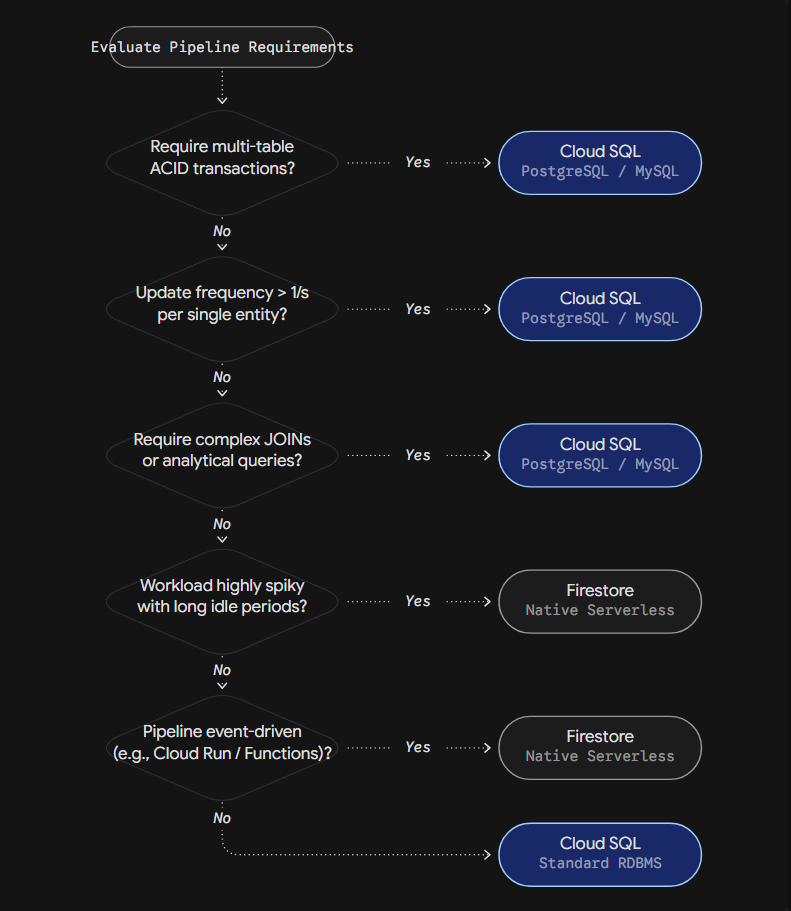
When to Use Cloud SQL (PostgreSQL) vs. Firestore
Data management in modern analytical platforms requires a strict separation of workloads. Large-scale analytical computations (OLAP) belong in the data warehouse, such as BigQuery. However, operational states, pipeline metadata, and execution logs (OLTP) require an entirely different architectural approach.
A data warehouse degrades when used as a state management backend. BigQuery uses columnar storage optimized for full table scans and massive aggregations. It is not designed for high-frequency row mutations, real-time webhook deduplication, or concurrent microservice locking. Attempting to force state logic into a DWH results in table locks, DML quota exhaustion, high latency, and unexpected billing costs.
To control state, modern tools like Cloud Run services, event-driven triggers, and orchestrators require an external transactional database. In the Google Cloud ecosystem, data engineers typically choose between relational Cloud SQL (PostgreSQL) and serverless NoSQL Firestore.
1. The Anatomy of State Management in Data Engineering
At the most basic level, state is the memory of a data pipeline. When a pipeline extracts data from an API, it needs to remember the last downloaded record. This memory is called a watermark. State also includes execution logs, which record whether a run was successful, failed, or is currently in progress.
As pipelines scale, state management becomes a mechanism for ensuring data integrity across distributed systems. When multiple microservices process webhooks simultaneously, they need a central authority to prevent processing the same event twice. This introduces the requirement for idempotency.
In high-throughput environments, state management handles distributed locks. If two parallel Cloud Run instances attempt to update the same target table, the state database acts as a traffic controller, issuing a lock to the first instance and forcing the second to wait. The database must guarantee that a read followed by a write operation is treated as a single, indivisible transaction to prevent race conditions.
2. Cloud SQL (PostgreSQL): The Relational Standard
Cloud SQL provides a managed relational database environment. It uses tables, rows, and strict schemas. If a pipeline needs to record a run ID, a timestamp, and a status, you define these exact columns. If the application tries to insert text into a timestamp column, the database rejects it. This protects data consistency.
Relational databases excel at linking data. If you need to join pipeline execution logs with detailed error messages stored in a separate table, PostgreSQL handles this natively using foreign keys and JOIN operations. It also guarantees ACID transactions (Atomicity, Consistency, Isolation, Durability) across multiple tables simultaneously.
However, integrating Cloud SQL with modern serverless compute introduces significant architectural challenges regarding connection management. Every time an application talks to PostgreSQL, it opens a TCP connection. A standard PostgreSQL instance can comfortably handle a few hundred active connections before it runs out of memory.
When you deploy a pipeline on Cloud Run, the service scales horizontally based on traffic. A sudden spike in events can cause Cloud Run to spin up 500 parallel container instances. If each instance opens a direct connection to the database, Cloud SQL will instantly exhaust its connection limit, causing the entire pipeline to crash.
To solve this, you must introduce a connection pooler, such as PgBouncer. The serverless functions connect to the pooler, which multiplexes thousands of lightweight connections into a small number of persistent database connections. Additionally, Cloud SQL requires a VPC (Virtual Private Cloud) setup. Serverless functions need Serverless VPC Access connectors to reach the private IP of the database, adding network routing complexity and infrastructure overhead.
Infrastructure (Terraform):
Terraform
resource "google_sql_database_instance" "state_db" {
  name             = "pipeline-state-pg"
  database_version = "POSTGRES_15"
  region           = "europe-west1"
  settings {
    tier = "db-custom-2-7680" # 2 vCPU, 7.5 GB RAM

    ip_configuration {
      ipv4_enabled    = false
      private_network = var.vpc_network_id
    }
  }
}
State Update with Connection Pooling (Python):
Python
from sqlalchemy import create_engine, Table, Column, String, MetaData, update

# The connection string must point to the PgBouncer endpoint, not the DB directly
engine = create_engine('postgresql://user:pass@pgbouncer-host:6432/dbname')
metadata = MetaData()

pipeline_state = Table('pipeline_state', metadata,
    Column('pipeline_id', String, primary_key=True),
    Column('last_run_id', String),
    Column('status', String)
)

def update_state(pipeline_id, run_id, status):
    with engine.begin() as conn:
        stmt = update(pipeline_state).where(
            pipeline_state.c.pipeline_id == pipeline_id
        ).values(last_run_id=run_id, status=status)
        conn.execute(stmt)
3. Firestore: Serverless NoSQL Agility
Firestore is a document database. It does not use tables or strict schemas. Instead, it stores data in JSON-like documents organized into collections. This makes development very fast. If you want to add a new field to your pipeline logs, you simply include it in the application code; the database accepts it without any schema migration.
Firestore is completely serverless. It scales from zero to tens of thousands of operations per second automatically. Unlike Cloud SQL, it connects over HTTP/gRPC APIs, which means there is no connection pooling to manage. You can spin up 1,000 Cloud Run instances simultaneously, and Firestore will handle the traffic without configuration changes or VPC routing.
Despite this horizontal scalability, Firestore has strict physical limitations regarding how data is written. The most critical constraint is that you cannot update a single document more than once per second in standard mode. If multiple pipeline workers try to update the same “global_status” document concurrently, the operations will queue, resulting in high latency or timeout errors.
Furthermore, you must design keys carefully to avoid hotspots. Firestore automatically indexes all fields. If you use monotonically increasing values, such as exact timestamps, as document IDs, all new writes are sent to the same physical storage partition. This creates a hotspot and degrades performance. To distribute the load across storage nodes, document IDs should be random hashes or UUIDs. If your system requires high-frequency counting (like tracking processed rows per second), you must implement distributed counters by sharding the document into multiple pieces and summing them during read operations.
Infrastructure (Terraform):
Terraform
resource "google_firestore_database" "state_db" {
  project     = var.project_id
  name        = "(default)"
  location_id = "europe-west1"
  type        = "FIRESTORE_NATIVE"
}
Transactional State Update (Python):
Python
from google.cloud import firestore

db = firestore.Client()

@firestore.transactional
def update_state_in_transaction(transaction, doc_ref, run_id, status):
    snapshot = doc_ref.get(transaction=transaction)

    # Example of optimistic concurrency control
    if snapshot.exists and snapshot.get('status') == 'LOCKED':
        raise ValueError("Pipeline is currently locked by another process")

    transaction.set(doc_ref, {
        'last_run_id': run_id,
        'status': status,
        'updated_at': firestore.SERVER_TIMESTAMP
    }, merge=True)

def execute_update(pipeline_id, run_id, status):
    transaction = db.transaction()
    doc_ref = db.collection('pipeline_states').document(pipeline_id)
    update_state_in_transaction(transaction, doc_ref, run_id, status)
4. FinOps: The Economics of State Management
The financial model of your database must match your data processing schedule. Choosing the wrong billing model can make the state management layer more expensive than the actual data processing.
Cloud SQL uses a provisioned capacity model. You rent the infrastructure. You pay a fixed monthly fee for the allocated vCPU, RAM, and storage space. The server runs continuously. This means the cost is highly predictable, but it also means you pay for idle time. If your pipeline runs a massive batch job once a day for two hours, the database sits idle for 22 hours, yet you pay for all 24. A highly available production instance typically starts around $80 to $100 per month.
Firestore uses a pay-per-operation model. You pay strictly for the data you process. The infrastructure cost is zero. You are billed based on the number of documents read, written, and deleted.
To compare these, we use a standard Total Cost of Ownership calculation.
The formula is: Total Monthly Cost = Fixed Infrastructure Cost + (Number of Reads / 1000000 * Cost per Million Reads) + (Number of Writes / 1000000 * Cost per Million Writes).
Standard Firestore pricing is approximately $0.036 per 100,000 reads ($0.36 per million) and $0.108 per 100,000 writes ($1.08 per million).
Scenario A: 1 Million Events per Month
If your pipeline logs 1 million events, requiring 1 write and 2 reads per event:
Cloud SQL Cost = ~$80.00 (Fixed baseline)
Firestore Cost = $0.00 (Base) + (2M / 1M * $0.36) + (1M / 1M * $1.08) = $0.72 + $1.08 = $1.80 per month.
For lightweight, event-driven pipelines, Firestore is the absolute financial winner.
Scenario B: 100 Million Events per Month
If the workload scales to 100 million events:
Cloud SQL Cost = ~$80.00 to $150.00 (Depending on CPU usage, but the cost remains relatively flat as long as resources hold up).
Firestore Cost = (200M / 1M * $0.36) + (100M / 1M * $1.08) = $72.00 + $108.00 = $180.00 per month.
At high volumes, the serverless model becomes more expensive. Furthermore, inefficient code heavily impacts Firestore billing. If a poorly designed Cloud Function continuously reads a Firestore document inside a loop while waiting for a status change, it will generate millions of billable reads per hour. In Cloud SQL, inefficient queries consume CPU capacity, causing slowdowns, but they do not immediately increase the monthly invoice.
5. Competitive Landscape: AWS and Azure
Understanding how these patterns translate to other cloud providers ensures you design architectures that remain logically sound in multi-cloud environments.
Amazon Web Services (AWS)
- Relational (Amazon RDS / Aurora): AWS Aurora is the direct counterpart to Cloud SQL. Aurora Serverless v2 attempts to bridge the gap between provisioned and serverless models by scaling compute capacity (ACUs) up and down based on load. However, it does not scale to zero. You always pay for a minimum baseline of capacity, making it fundamentally different from pure serverless models.
- NoSQL (Amazon DynamoDB): DynamoDB is the AWS equivalent to Firestore. It shares the pay-per-request pricing model, though it is generally cheaper for reads and slightly more expensive for writes. The major architectural difference lies in data distribution. Firestore handles indexing automatically, but DynamoDB requires you to explicitly define Partition Keys and Sort Keys. If you design a poor partition key in DynamoDB, all your read and write capacity is routed to a single physical server, creating a “hot partition.” This will result in throttled requests, even if you are well within your billing limits.
Microsoft Azure
- Relational (Azure Database for PostgreSQL): This provides a similar experience to Cloud SQL, offering standard managed database features with deep integration into Azure Data Factory for orchestration state management.
- NoSQL (Azure Cosmos DB): Cosmos DB is a multi-model database that supports document, key-value, and graph data. It is significantly more complex than Firestore. It offers granular control over data consistency levels (from strong to eventual). However, its primary scaling metric is Request Units per second (RU/s). Estimating the exact RU/s required for a pipeline can be difficult, and over-provisioning leads to high costs. While Azure offers a serverless tier for Cosmos DB, its baseline complexity and entry costs often make it heavier than Firestore for simple pipeline state tracking.
6. Decision Matrix
The following decision path summarizes the architectural logic for choosing between the two systems.
Pipeline State Decision Engine
Cloud SQL (PostgreSQL) vs Firestore architectural routing